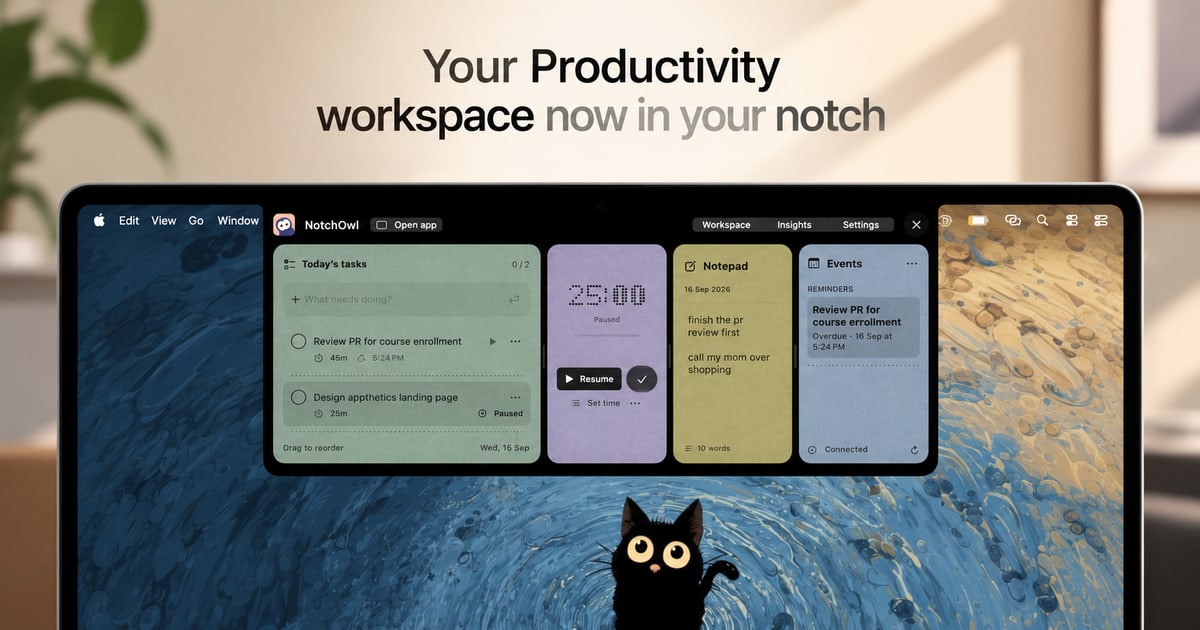
NotchOwl is a Mac app that turns the notch at the top of a MacBook display into a small, always-available productivity workspace. From that one spot it brings together four things: tasks, a focus timer, a daily notepad, and today’s calendar events. The promise is simple: everything you need to stay on track sits one hover away, so you never have to switch windows just to add a task, start a focus session, jot down a note, or check what is coming up next. It is designed for people who spend their day on a Mac and want their planning, capturing, and timing tools to stay within reach instead of being scattered across separate apps.
Most productivity tools live in their own window, tab, or app. That means every small action—recording a task, writing down a thought, starting a timer—pulls you out of the work you were actually doing. NotchOwl takes the opposite approach. The Mac’s notch is a piece of screen real estate that normally does nothing, and NotchOwl turns it into a persistent surface that is always a hover away. Because the workspace opens on hover or with the Option–N keyboard shortcut and collapses again when you are done, the cost of capturing something or checking your status drops to almost nothing. A running focus timer even stays visible in the notch after the panel is closed, so progress stays in view without taking up a window.
The focus timer is built around one task at a time. You pick a task and give it a time limit, or you let a stopwatch run when you do not need a deadline. While you work, the timer stays visible in the notch, so a glance upward tells you how much time remains without opening anything. You can pause it, resume it, or add five minutes when a task needs a little longer. Timers pause when your Mac sleeps, and Insights counts only active focus time, which means the numbers you review later reflect genuine working time rather than minutes lost to idle or sleeping sessions. That single-task framing is deliberate: it keeps one thing in front of you, with a visible clock, instead of a long list competing for attention.
The daily notepad covers the capture side of the app. It is a lightweight place to jot down an idea, save a link, or note something you want to follow up on later. It saves as you type, so there is no save button to remember and nothing lost if you close the panel and move on. The notepad is not a dead end, either. When a line you wrote turns out to be something you actually need to do, you put the cursor on that line and press Command–Return to turn that line into a task. That keeps capture and planning in the same place, so a passing thought can become tracked work in a single keystroke rather than a copy-and-paste trip to another app.
NotchOwl can also surface today’s upcoming events inside the notch workspace, so your next meeting or appointment is visible alongside your task and timer. Calendar access is optional. When you connect it, the notch shows events from calendars that are already added to Apple Calendar on your Mac. macOS labels the permission as Full Access, but NotchOwl only reads events—it never creates, edits, or deletes them. Insights covers the reflection side. A busy week is hard to remember accurately, so Insights brings together completed tasks, active focus time, and daily activity in one view, letting you see what you finished and where your attention actually went.
Using NotchOwl starts with the notch itself. You open the workspace by hovering over your Mac’s notch or by pressing Option–N. From there you can add a task, start a focus session, jot down a note, or check today’s upcoming events, then close the panel when you are ready to get back to work. A running timer stays visible in the notch, so the workspace can be out of the way while your session continues. The app is deliberately local: after license activation, your tasks, notes, and timers work offline and your planner data stays on your Mac. An internet connection is needed only for activation, deactivation, and update checks, and you can export your planner data as a JSON backup at any time.
The benefits follow from that design. Less switching means more doing: because the workspace is a hover or a shortcut away, you stop losing momentum to app changes. Keeping your next task close makes it easier to start the thing you already decided to do. A timer that stays visible in the notch encourages you to stay with a task instead of drifting, and the option to add five minutes keeps a session flexible when a task runs long. Notes that save automatically and convert to tasks mean ideas survive the moment you have them. Insights gives you a record of completed tasks and active focus time without manual time tracking, so you can see the work you put in even during a busy week.
Concrete uses follow the same rhythm. Timeboxing a single task: pick it, set a limit, and watch the countdown in the notch while you work, pausing or adding five minutes as needed. Capturing on the fly: jot a link or an idea into the daily notepad mid-task without leaving what you are doing, then turn the useful lines into tasks with Command–Return. Planning the day: hover the notch before starting work, add tasks, and check today’s upcoming events. Pre-meeting check: glance at the notch to see what is next. Weekly review: open Insights to see completed tasks and active focus time and judge where your attention went. Offline work: once activated, keep using tasks, notes, and timers without a connection, and export a JSON backup when you want one.
NotchOwl is aimed at Mac users who plan and time their work, including people who spend long stretches in front of a MacBook and want a lightweight place to keep tasks, notes, focus, and calendar events together. It requires macOS 14 or later, and the current download is for Apple silicon Macs. A notch is not required: on displays without one, NotchOwl opens at the top centre of the screen below the menu bar, and you can also open a full dashboard. Pricing is a one-time $4.9 USD lifetime license covering all NotchOwl features, lifetime updates, and activation on up to three Macs, with a 14-day money-back guarantee and no subscription. The installer is free to download, but a paid license is required to use the app; after checkout, the key arrives in a Dodo Payments email and is entered in the Mac app. You can deactivate a Mac from the License section in Settings and move the key to a new machine, subject to the three-Mac limit.
NotchOwl’s core value proposition is proximity. It takes a space on your Mac that is always there—the notch—and fills it with the handful of things that keep a day on track: tasks, a focus timer, a self-saving notepad, calendar events, and a record of what you actually finished. One hover or one shortcut is the whole interaction cost. Buy once, use it on up to three Macs, and keep your next task close, your ideas captured, and your focus on the work in front of you.
Publisher
A
admin
Launch Date2026-09-20
Platformdesktop
Pricingpaid