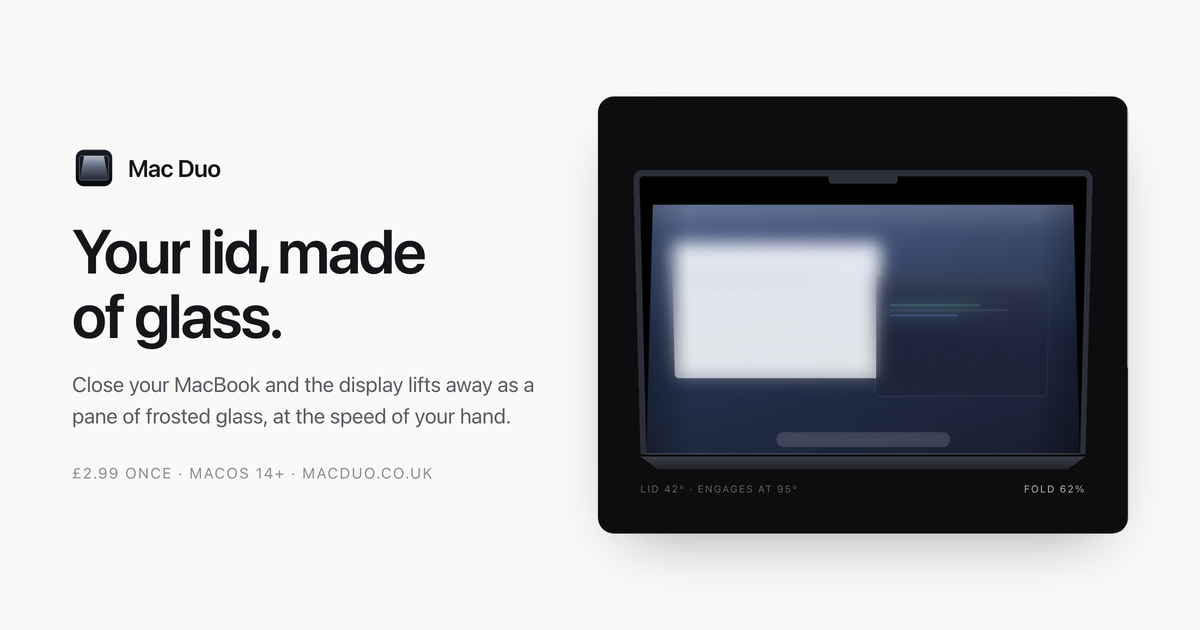
Mac Duo is a macOS app that turns your display into a pane of frosted glass as you close the lid. Close your MacBook and the display lifts away as a pane of frosted glass, moving at the speed of your hand: stop, and it stops; open it again and the whole thing retraces itself. The site describes the app as producing "a material" and "a small event, every time" — a pane of frosted glass, hinged along the bottom edge of your display and moved by your lid. It sits quietly in the menu bar, and it is aimed squarely at MacBook owners who want a distinctive, physical-feeling effect attached to an everyday action rather than a static overlay painted over their screen.
The idea comes from the fold on iPhone Duo, recreated on a MacBook, and the site is deliberate about how that effect is built. Rather than being painted over a screenshot, the glass is modelled — it lifts, leans and catches the light. That distinction runs through everything described on the page: the team repeatedly contrasts what Mac Duo does with a blur laid on top of a capture. What the app delivers is a small, repeated moment that accompanies opening and closing a laptop: a hinge-driven material that behaves like a real pane of glass sitting above the screen, with a gap that opens and closes in step with the lid. Every behaviour documented on the site — engagement angles, frost growth, grain in the material — follows from that framing of glass as a material rather than a filter.
The first capability is that your lid moves it, and nothing else does. The fold reads the lid-angle sensor directly. Move slowly and it moves slowly. Stop halfway and it holds there. Reverse, and it unfolds. The page shows a live readout of the lid angle alongside the fold position, and notes that Responsiveness and Hinge sensitivity decide how tightly the fold tracks your hand. Because the same lid angle always means the same glass, opening the lid retraces the closing animation exactly, which makes the effect fully reversible and predictable rather than a one-way animation that plays when the lid opens or closes.
The second capability is clear where it touches, frosted where it lifts. The pane lifts off the display as it tilts. The gap is nothing at the hinge and grows toward the top, so the bottom of your screen stays almost untouched while the top frosts over. The site illustrates this with a diagram showing the gap driving the frost, noting a value such as 0.20 at the top, and stresses that the frost climbs with the gap between pane and screen: the bottom of your display stays clear and the top goes milky. Closely tied to this is the third capability — etched glass, not a blur. Grain sits in the material and there are no highlights, because etched glass scatters light rather than reflecting it. The app explicitly positions itself as "not a blur laid over a screenshot."
Inside the app, you can see every change without closing a thing. A live picture of the material sits beside the controls, with a scrubber that runs the fold by hand, so the effect can be inspected without repeatedly opening and closing the laptop. Frost, Perspective and Edge softness shape the glass, while Responsiveness and Hinge sensitivity decide how tightly it tracks. Intensity offers Low, Medium and High with those sliders underneath, and the glass can match your system appearance or stay light or dark. Play the fold to watch the whole thing, and Reset puts every setting back. The app can also show the live lid angle in the menu bar, where it sits quietly.
How the product works overall is set out in the details section. Lid sensor: Mac Duo reads the hinge angle from the Mac's own sensor — the fold engages at 95° and is complete by 12°, and the same angle always means the same glass, so opening retraces closing exactly. Live display: your screen is captured and the glass is rendered over it with Metal, so windows and wallpaper move as one surface rather than as layers. At rest: nothing runs while the lid is still — no background work, and no cost to leaving it on. Screen Recording permission is required and, the site says plainly, is not optional: the glass is built out of your live display, so without that permission there is nothing to render.
Several benefits follow directly from that design. On privacy, the display is read to build the glass and those frames stay in memory — nothing is written to disk and nothing is sent anywhere. Capture runs only while the lid is in motion and stops the moment it settles. Mac Duo has no analytics, accounts or tracking; its only network connection is an optional software-update check against macduo.co.uk, which can be turned off at any time. There is no account, no licence key and no trial countdown: you pay, download the disk image, drag it to Applications, and the app is yours on up to five Macs, with a refund available on request. On performance, the site states that it does nothing at all when the lid is not moving — no background work, no polling — and that while animating it takes about 1.5 ms a frame on an M3 at full resolution, with room to spare at 120 fps.
In practice, Mac Duo is used in the moment you close and open your MacBook lid: the fold engages as the lid passes the engagement angle, tracks the motion of your hand, holds when you stop halfway, and unfolds when you reverse. The app window supports inspecting and tuning the material without closing anything — a live picture sits beside the controls, a scrubber runs the fold by hand, Play plays the whole fold and Reset restores every setting. The menu bar keeps the live lid angle visible if you want it, and the software can be installed on up to five of your own Macs. The site also presents the effect recorded live, with no cuts, as a demonstration of how it behaves in real time.
Requirements and details are documented in advance. Mac Duo needs macOS 14.0 Sonoma or later and any Mac with a built-in display. Apple silicon MacBooks get the full effect because they carry the lid-angle sensor the animation is driven by. Intel MacBooks work, but fall back to a timed animation on lid open and close rather than tracking the hinge continuously. Desktop Macs have no lid, so there is no effect. The download is a universal binary at 2.3 MB. Pricing is a single payment of £2.99 covering up to five Macs, with a refund on request. One rough edge is stated up front: the build is not yet notarized by Apple, so the first launch will warn that macOS cannot verify the app is free of malware — the workaround is to open System Settings → Privacy & Security, scroll down and click Open Anyway, which is only needed once.
Mac Duo's proposition is narrow and specific: turn your display into a pane of frosted glass as you close the lid, driven by the hinge sensor so it moves at the speed of your hand. It is a material rather than a blur or a screenshot overlay — it lifts, leans and catches the light, frosted where it lifts and clear where it touches, with grain instead of highlights. It runs only while the lid is moving, keeps everything on your Mac, needs no account or licence key, and costs £2.99 once for up to five Macs.
Publisher
A
admin
Launch Date2026-09-16
Platformdesktop
Pricingpaid
Tech Stack
#macOS#Metal