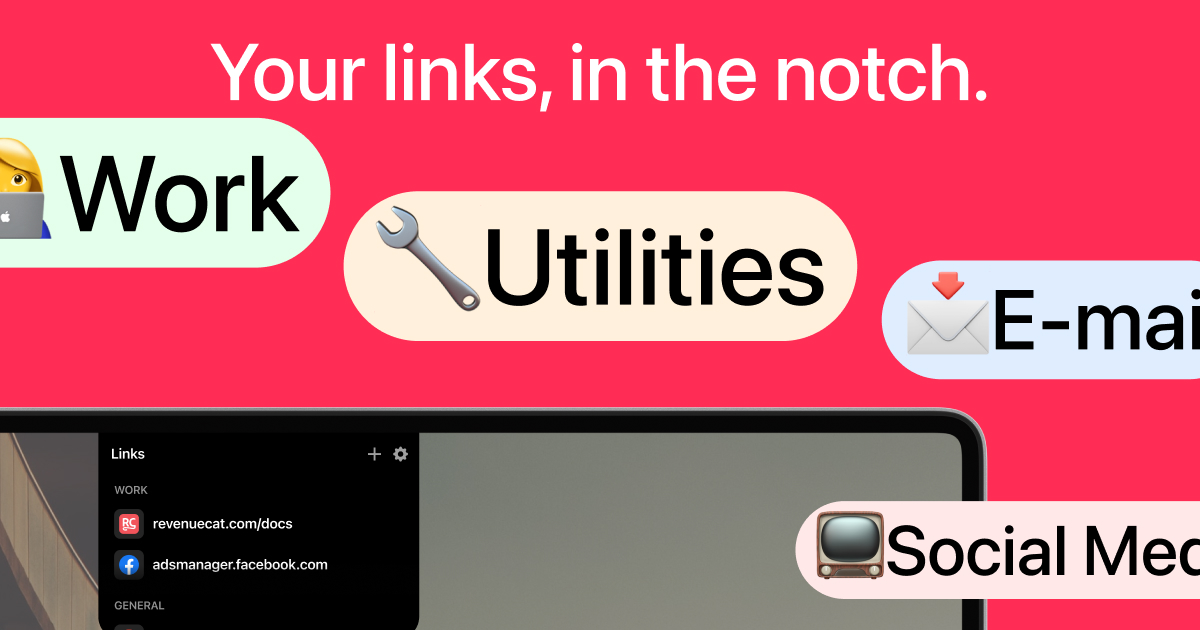
LinkNotch is a specialized productivity application designed exclusively for MacBook users, transforming the physical notch at the top of the screen into an interactive, always-accessible hub for your most important web links. It serves professionals, students, and anyone who frequently switches between specific websites, eliminating the tedious process of searching through bookmarks or browser history. The core purpose is to provide instantaneous, one-click or hover-based access to predefined links, directly from the MacBook's notch area, thereby streamlining digital workflows and saving valuable time during busy work sessions. By repurposing an often-underutilized hardware feature, LinkNotch creates a novel and efficient shortcut system that integrates seamlessly into the macOS environment, offering a unique solution to a common modern computing problem.
In today's fast-paced digital work environment, users constantly juggle multiple browser tabs, applications, and online resources, leading to significant productivity loss from context switching and navigation. The primary pain point addressed is the excessive time wasted manually searching for and opening frequently used websites, whether it's a project management dashboard, a documentation page, or a communication platform. This disruption breaks concentration, increases cognitive load, and fragments the workflow, especially when the needed link is buried among dozens of open tabs or deep within bookmark folders. For MacBook Pro and Air users, the screen notch represents a fixed hardware element, and LinkNotch directly tackles this inefficiency by converting that static space into a dynamic, productivity-enhancing asset, solving a real and persistent annoyance in daily computer use.
The first major feature group is the notch-integrated link launcher, which allows users to open any saved website in approximately one second through a simple hover gesture or a direct click on the notch area. This works by running a lightweight menu bar application that overlays a responsive, interactive interface onto the MacBook's notch, detecting cursor proximity to trigger a pop-up panel containing the user's categorized links. The technical implementation ensures minimal system resource usage while providing instantaneous feedback, making link access faster than any traditional method like typing URLs, using bookmarks, or searching history. This matters because it reduces physical and mental effort, keeping users in their flow state by providing a frictionless pathway to essential online tools and information directly from their primary workspace, without alt-tabbing or window management.
admin
A second critical feature is the customizable link organization system, where users can create and manage multiple categories, such as 'WORK' and 'GENERAL', as demonstrated in the provided interface examples with links to revenuecat.com/docs and google.com. This system supports adding links with associated favicons for visual recognition, allowing for intuitive grouping based on projects, contexts, or urgency. The settings panel, indicated by a gear icon, provides controls for editing these categories, adding new links via URL input, and arranging the order of items for personalized priority. This organizational depth is vital because it mirrors the user's mental model and workflow structure, enabling quick access not just to single links but to entire suites of related resources, transforming the notch into a personalized command center tailored to individual or professional needs.
Additional capabilities include seamless system integration, running as a native macOS application that sits discreetly in the menu bar while providing persistent, system-wide access regardless of which application is currently active. The app respects macOS design guidelines, ensuring compatibility and a native feel alongside other dock applications like Finder, Reminders, Notes, Freeform, App Store, and system folders. It operates without interfering with other notch-related system functions, maintaining the integrity of the macOS menu bar while adding its functional layer. This background operation is crucial for a utility tool, as it guarantees the link hub is always available but never obtrusive, requiring no active window management or workspace switching from the user, thereby upholding its promise of instant access without adding desktop clutter or distraction.
The product works overall by installing as a standard Mac application from the App Store, after which it resides in the menu bar and activates its interactive layer when the user moves the cursor to the notch region. The technical approach involves a low-level event listener for cursor positioning, coupled with a transparent overlay window that renders the user's predefined link buttons and categories only when triggered. This design ensures zero performance impact on other tasks while providing sub-second response times. The architecture is built to be stable and reliable, leveraging macOS frameworks to create a smooth, responsive experience that feels like an extension of the operating system itself, rather than a separate application, which is key to its utility and user adoption for daily productivity enhancement.
Key benefits and measurable outcomes for users include a dramatic reduction in the time spent searching for and opening frequently used links, directly translating to more focused work periods and higher daily output. Users can expect to reclaim minutes every hour previously lost to navigation clutter, which accumulates to hours saved per week. The reduction in context switching and manual search effort also lowers cognitive fatigue, allowing for sustained concentration on complex tasks. The tangible outcome is a smoother, more efficient digital workflow where essential web resources are literally at your fingertips, or more accurately, at your cursor's hover point, making repetitive online access tasks nearly effortless and integrating seamlessly into muscle memory for power users.
Concrete use cases include a developer who needs quick access to documentation sites like revenuecat.com/docs while coding, a digital marketer managing multiple ad platforms like adsmanager.facebook.com, a researcher frequently checking reference sites, or a student switching between learning portals and search engines. Specific workflow examples involve hovering over the notch during a video call to instantly pull up a shared document link, or clicking the notch while writing a report to open a research site without breaking typing flow. In a customer support role, it allows immediate access to ticket systems and knowledge bases; for a project manager, it provides one-second entry to task boards and team dashboards, effectively removing all friction from these routine but critical digital transitions.
The target users are primarily MacBook Pro and MacBook Air owners who value productivity optimization, including professionals like software developers, digital marketers, writers, researchers, and students who rely on a core set of web tools daily. The application integrates with the user's existing browser ecosystem, working alongside Chrome, Safari, or others to open links, and fits into the macOS tech stack as a native utility. While specific pricing plans are not detailed in the provided content, it is available for download via the Mac App Store, suggesting a potential one-time purchase or free model. Its value is highest for users with established, repetitive web navigation patterns who are seeking to minimize friction and maximize their efficient use of time during computer-based work.
In summary, LinkNotch offers a uniquely clever repurposing of the MacBook notch, transforming it from a passive hardware quirk into an active productivity powerhouse. By providing instantaneous, organized access to favorite links through hover or click, it directly attacks the widespread inefficiency of manual web navigation. The primary takeaway is that this tool can significantly streamline daily computer use, saving time, reducing frustration, and helping users maintain focus by placing essential digital resources exactly where they are needed most—right at the center of their visual and interactive workspace.
LinkNotch is designed for MacBook Pro and MacBook Air users who seek to optimize their daily productivity. This includes professionals like software developers, digital marketers, writers, and project managers who frequently use a core set of web-based tools and platforms. It also serves students and researchers who navigate between multiple online resources. The ideal user values efficiency, has established repetitive web navigation patterns, and wants to minimize the friction and time lost in searching for and opening frequently visited websites directly from their primary workspace.
Updated 2026-02-28