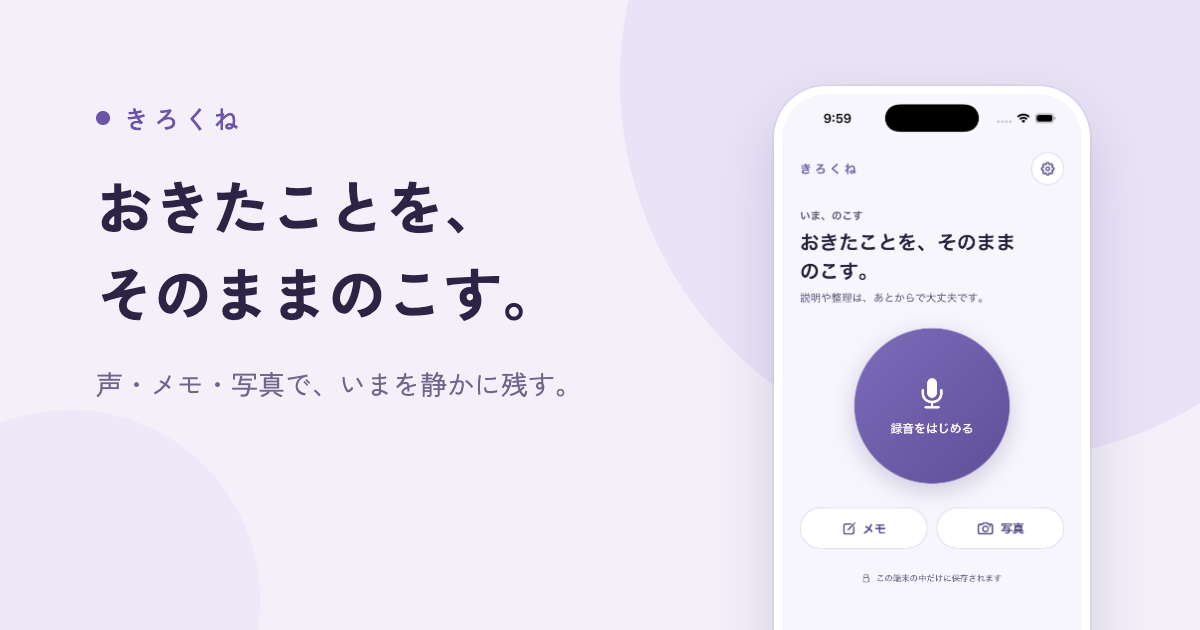
Kirokune is an iPhone app for logging work and personal incidents with notes, voice recordings and photos, and it is available on the App Store. It is built for people who have been told to document what happens to them and want a private place to do it, keeping every record on their own iPhone rather than behind an account somewhere online. You can write down what happened in your own words, save a voice note, or take a photo, and the app organizes what you save into a timeline. No account is required — you open the app and start. Kirokune requires an iPhone with iOS 17 or later, is free to download with in-app purchases, and is available in the United States and India.
The premise behind the product is the phrase almost everyone has heard: everyone says document everything. Kirokune's own framing is that you do not have to let something go just to get through the day. The difficult part is rarely the intention to keep a record; it is finding a way to do it at the moment something happens, when you may be stressed, rushed, or simply unable to bring yourself to type out a long account. The details that matter later — the date, the time, where it happened, what was said and who was there — are easiest to capture while they are fresh, and much harder to rebuild from memory weeks afterwards. Kirokune gives that moment somewhere to land, so a record exists even before you have decided what, if anything, you want to do with it.
The first capability in Kirokune is capturing a record quickly, in whatever form is easiest at the time. One tap starts a recording, which the app describes as useful even when you cannot bring yourself to type. A photo works too, and so does a quick note written in your own words — Kirokune notes that a short note is enough to begin. There is no setup first: you open the app and start a note, a recording, or a photo. Because an entry can take several different shapes, the tool does not force one particular workflow on you in the middle of a difficult moment. You can pick the format that fits the situation and sort out the rest afterwards.
Once something has been saved, Kirokune puts it in order. Records appear in a timeline alongside your original notes, with dates, times and exact words, so you can see events in time order and review them against what you actually wrote. The app states that nothing you already wrote gets changed — the record stays exactly the way you wrote it, and the timeline supplies context rather than rewriting your account. Records are kept in a case, and the free plan allows unlimited records inside one case. The optional Kirokune Plus plan adds unlimited cases, so you can give separate situations their own collections instead of keeping everything in a single place.
Kirokune can also import a chat export file as a record. You choose a supported export file from Apple Messages, Messenger or Instagram without connecting your chat accounts, and the app keeps the file's whole original text alongside the messages it can display; Kirokune advises choosing the conversation and date range before exporting where the service allows it. Recording incidents is only part of the point, because the app also helps you prepare for a conversation. When you are ready, you can look back at what you saved at your own pace and pull it into a summary you can walk someone through. Paid Kirokune Plus adds detailed reviews and PDF export for this stage.
Kirokune describes its own approach in three steps. First, get it down: open the app and start a note, a recording, or a photo, with no setup first. Second, sort it later: when you have the energy, group what you saved into a private case. Third, look back: everything in order, exactly the way you wrote it. Separating capture from organization this way is what makes the app usable in the moment — you are not asked to decide on structure, titles or categories while something is happening, only to get the detail down. The structure comes later, when you have the time and the composure to put what you saved into a case and read it back in sequence.
Privacy and honest limits are central to the product. Records stay on your iPhone, and nothing leaves the app unless you export it yourself; there is no account to create. The app currently provides no automatic sync or cloud backup, and Restore Purchases only checks access to your paid plan — it does not restore a backup of your records — so users are told to keep their own copies of needed records and original files before deleting the app. Kirokune also states plainly what it does not do: it does not diagnose, decide what happened, or give legal advice, and it keeps your own record organized and that is all. It cannot tell you whether a recording is lawful, noting that rules about recording and sharing a conversation vary by place and situation, and it suggests considering letting the other person know and checking the rules where you are. Naming the other person is not required either — initials or a nickname you would recognize later works fine.
The outcome Kirokune aims for is that you will not have to go from memory. When you decide to talk it through — with someone you trust, HR, a lawyer or a support service — having it written down in your own words helps you explain what happened. Records you captured near the moment, kept in time order with the original wording intact, give a clearer account than a recollection assembled afterwards. Because multiple formats are accepted, a record can exist even when you could not type; because cases keep things together, related entries are not scattered; and because nothing you wrote is changed, the record you bring to a conversation is the record you made.
Several concrete workflows follow from these features. In one, you document a workplace incident by noting the date, the time, where it happened, what was said and who was there as soon as you can, with Kirokune holding all of that together in one private place in time order. In another, you capture something in the moment when typing is not possible, starting a recording with one tap, or taking a photo, or writing a quick note, and group it into a case later when you have the energy. You might save a chat conversation with its context by exporting from Apple Messages, Messenger or Instagram and choosing the conversation and date range where the service allows it. Later, you prepare for a conversation: looking back at what you saved at your own pace and pulling it into a summary you can walk someone through, with detailed reviews and PDF export available in Plus. And if you are not ready for an app at all, the website offers a free workplace incident log template and example worksheet you can use in your own notes without installing anything or creating an account.
Kirokune is intended for people who have been told to document what happens at work and want a private place to keep those records on their own iPhone, as well as for anyone recording personal incidents. It is available in the United States and India, with English, Japanese, Traditional Chinese, Korean and Spanish interfaces, and runs on an iPhone with iOS 17 or later. The free plan covers unlimited notes, recordings, photos and other records organized in one case, with no account or paid plan required. The optional Kirokune Plus plan adds unlimited cases, detailed reviews, PDF export and removal of ads, and is offered as a monthly, yearly or one-time lifetime purchase; the purchase screen shows your local price and renewal terms before you decide. There is no Android app, and the free worksheet on the website works without installing anything.
Kirokune's value proposition is narrow and deliberate: a private, account-free place on your iPhone to write down, record or photograph what happened, to keep those records in time order without changing a word of them, and to read them back when you are ready to talk. It does not decide what happened, does not give legal advice, and does not move your records off your device on its own. What it provides is the thing everyone is told to do and few have a workable way to do: documenting the moment, in your own words, so that later you are not relying on memory.
Publisher
A
admin
Launch Date2026-09-14
Platformmobile
Pricingfreemium