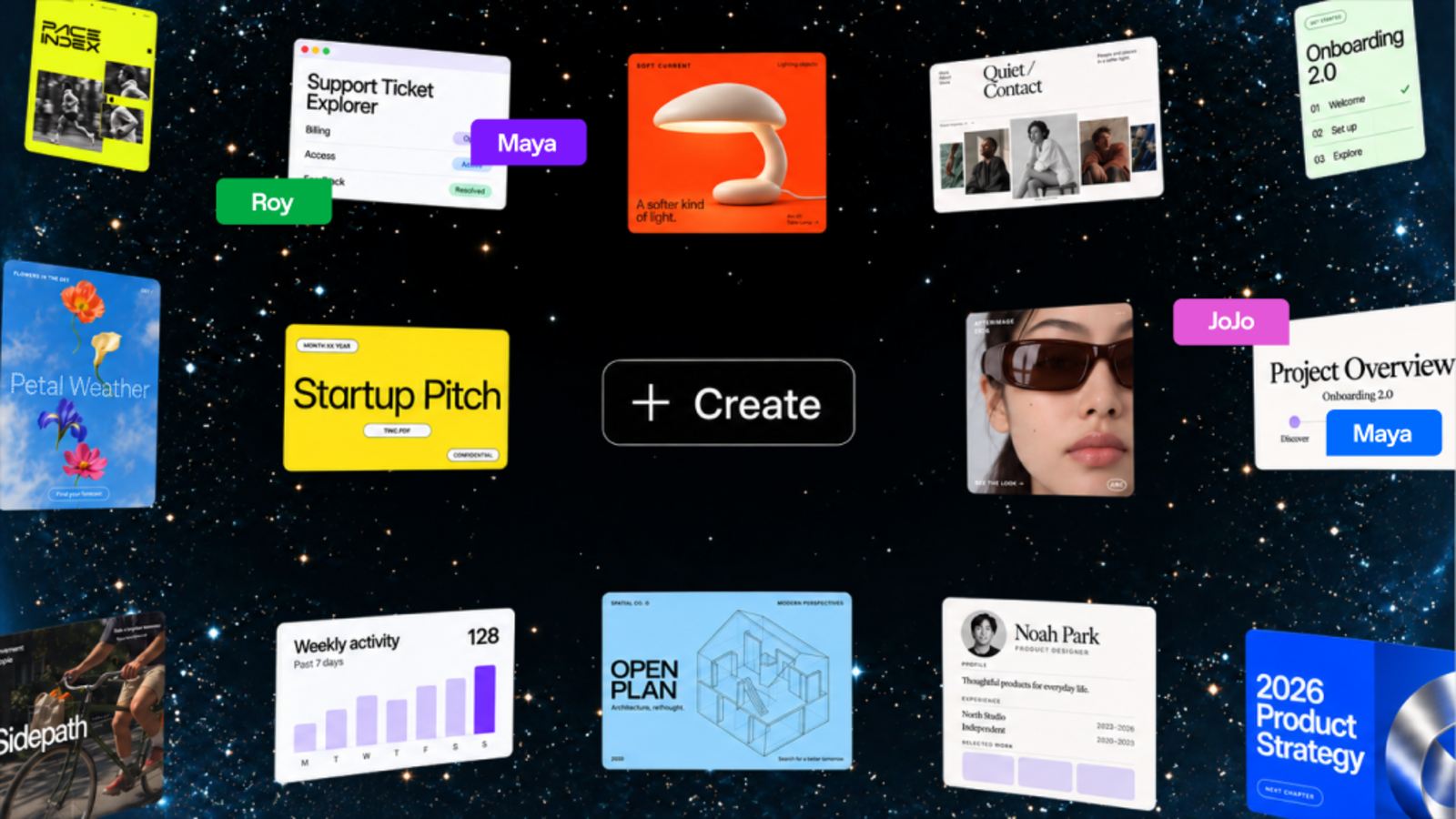
ChatGPT Space is a shared workspace from OpenAI where people and AI create living documents together. It gives teams one place to keep project context, files, and shared pages, and lets them tag in ChatGPT, Codex, or a dot to help move work forward. Pages bring together text, images, charts, and interactive tools, and can be edited with teammates in real time. Space replaces Library and is the home for the pages and files you create, upload, and share in ChatGPT, including spreadsheets and presentations. It is built for collaborative work where both people and agents contribute to the same source of truth.
Work is usually scattered across documents, chat threads, files, and separate tools, so context drifts and documents go stale. Space addresses that by making shared context the foundation of the work: instead of copying information between tools, teams keep pages, slides, spreadsheets, and files in one shared place that ChatGPT and their dot can reference. Pages can stay updated from connected tools, so teams can focus on the work rather than on updating the doc. Because AI assistance lives inside the same page as the people and the content, suggested changes happen where the work already is.
Powerful, self-updating pages are a new type of document built for work you do with agents. On a page you can write, visualize, research, and code, and pages can stay updated from your connected tools so you do not have to keep the doc current by hand. You can ask ChatGPT or your dot to organize the work with checklists, images, charts, and tables, then keep improving it together right on the page. You can also give a page instructions, telling ChatGPT what to update, which sources to use, and when to check, then return to review what changed and decide what comes next.
Space is designed for working together with AI. Teammates with edit access can work on the same page at the same time, each person working with their own ChatGPT to ask questions or make changes to the shared page. You can leave feedback in comments or tag others for feedback, and @mention ChatGPT or your dot in a comment to make changes or take on next steps without leaving the page. Sharing happens through the Share menu: invite people or teams in your ChatGPT workspace on workspace plans and choose view or edit access, or on eligible personal plans invite people by email or share by link where available.
Space is a home for shared knowledge. You can bring your team's files, pages, slides, spreadsheets, and more into one shared place, and ChatGPT and your dot can use that context to help your team build on what is already done. That shared context is available for both teammates and agents: you can ask ChatGPT or your dot to keep dashboards updated, turn a teammate's design into engineering tasks, or flag blockers. New work your team creates builds on that shared context, so goals, plans, and designs stay connected to the work that follows them.
Other capabilities extend the same idea. A to-do list that updates itself pulls to-dos from Slack, email, and your calendar into a page, and ChatGPT or your dot can keep items, due dates, and next steps current as priorities shift, so you spend more time doing the work and less time making the list. You can also visualize anything on a page, including prototypes, research, data, or key decisions, editing together with your team and tagging ChatGPT, Codex, or your dot to work through changes. Dots work natively across files in Space, and wherever you work with your dot, in ChatGPT, Slack, or Microsoft Teams, you can also ask it to keep the page up to date as plans change. Texting is coming soon.
Getting started follows a simple pattern. You can begin with a conversation or a template: ask ChatGPT to turn an existing conversation into a page or slides, or start from a template. From there you refine the work with ChatGPT, then bring others in by sharing the page and editing together in real time. You can create a team space by giving it a name and adding individual team members or your entire team, and tell ChatGPT about your projects and priorities. Recurring updates are handled by setting up an automation with instructions for what to update, which sources to use, and how often to run, after which you return to the page to review the changes. Pages can also be browsed or searched, and favorites saved for quick access.
The outcome is a workspace where context accumulates instead of fragmenting. Because files uploaded into a page follow that page's permissions, and because sharing a page does not give collaborators access to your private chats or personal memory, teams can collaborate on the work itself while keeping individual conversations private. Linking to a separate file does not grant access to it, since its own permissions still apply, and any content copied or summarized onto the page is visible to collaborators. For Business and Enterprise, OpenAI does not train on ChatGPT Business or Enterprise data by default, while individual accounts follow their own training and memory settings.
Concrete scenarios described for Space include visualizing an onboarding prototype on a shared page with teammate cursors, turning a conversation into slides using a team's template, and turning a teammate's design into engineering tasks. Teams can maintain dashboards that stay updated, flag blockers, and keep a launch plan current by having ChatGPT or a dot pull in changes. Meeting notes created by the Meetings plugin can be reviewed and then turned into research, a drafted message, or an updated plan that is brought into a page and selectively shared with the team. To-dos pulled from Slack, email, and the calendar keep daily priorities current.
Space is available on ChatGPT Pro, Business, and Enterprise plans and replaces Library. You can create, edit, and collaborate on pages on web and desktop, while on mobile you can find, read, and share pages; creating and editing pages is not supported at launch, and mobile editing and collaboration are coming soon. Collaborative slides and spreadsheets are also coming soon. Content can be brought in from connected tools such as Google Drive and Slack, and the Meetings plugin, available in beta on Pro and Business plans in the ChatGPT desktop app for macOS, creates private, personalized notes and suggests follow-ups. Workspace availability and sharing are subject to admin settings.
ChatGPT Space turns a workspace into a shared canvas where people and AI build on the same context. By keeping pages, files, slides, and spreadsheets together and letting teammates tag in ChatGPT, Codex, or their dot directly on the page, it keeps projects moving and teams aligned in one place.
Publisher
A
admin
Launch Date2026-10-05
Platformweb
Pricingpaid
Traffic Insights
Month2026-10
Estimated Visits5.6B
MoM Visits GrowthN/A
Avg Time on Site-
MoM Time GrowthN/A
Global Rank#11
Bounce Rate-
Updated 2026-10-05