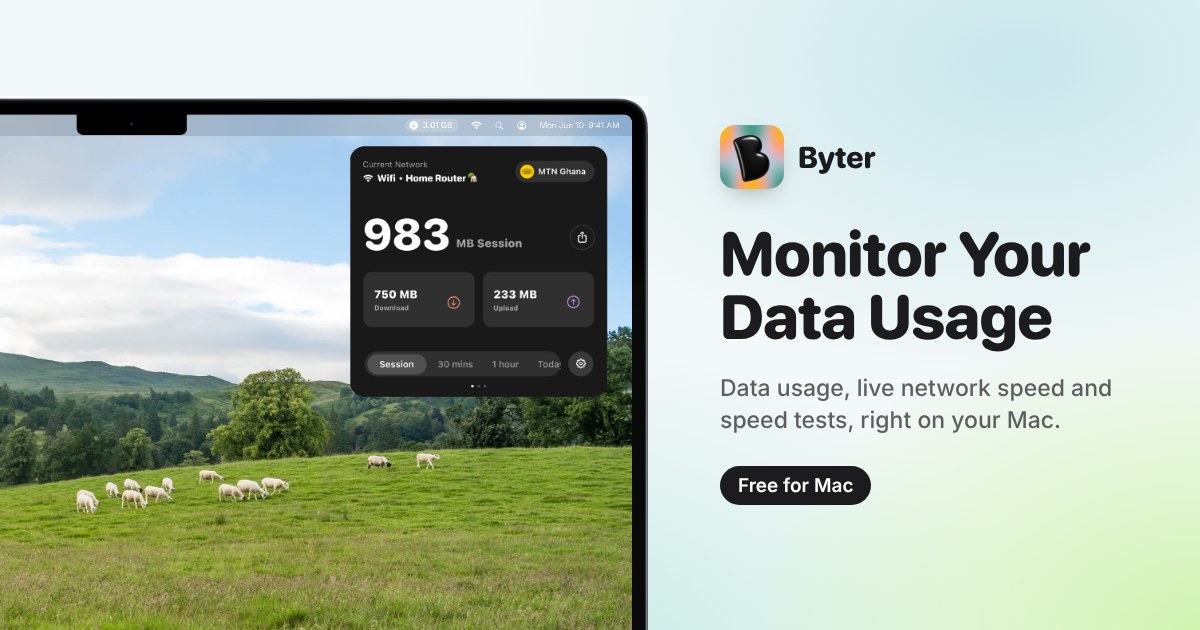
Byter is a free Mac menu bar app that measures and displays how much internet data you use, and on which connection. It runs in the macOS menu bar and keeps a separate running total for every Wi-Fi network you join, every phone hotspot you tether to, and every wired connection you plug in. The app's stated purpose is straightforward: to let you know exactly how much data you use, on every network. Alongside the usage totals, Byter shows live speed, offers a one-click speed test, and presents usage charts that range from daily to yearly. It is built for Mac users who want a clear, at-a-glance answer to how much data their machine is actually consuming, without accounts or advertising.
The problem Byter addresses is that data consumption on a laptop is usually invisible and unattributed. A Mac can connect to home Wi-Fi, a work network, a coffee shop network, a phone hotspot and a wired connection, all in the same week, and the device itself does not break down how much of your usage belongs to each one. That matters most when some of those connections are metered. Byter's own framing of the problem is that it lets you know exactly what your hotspot bundle went on, which is the kind of question a single, combined usage figure cannot answer. By attributing usage to individual networks, the app turns an opaque total into something you can actually reason about, and it does so continuously in the background rather than only when you remember to check.
The core of the product is separate usage tracking for every Wi-Fi network, phone hotspot and wired connection. Rather than pooling all traffic into one counter, Byter maintains an individual record per network, so the total for a hotel Wi-Fi network is kept apart from the total for a tethered phone. This is what makes the app useful in metered situations: when a hotspot has a limited allowance, the relevant number is the hotspot's own total, not the machine's lifetime traffic. The same separation applies to wired connections, so a desk setup that uses Ethernet is accounted for distinctly from wireless sessions. Each connection keeps its own figure, and the result is a per-connection picture of where data actually went.
Byter also reports live speed and includes a one-click speed test. Live speed gives a continuous read on how fast the current connection is running at any given moment, while the speed test provides a deliberate check that can be triggered with a single click when you want a defined measurement rather than a running readout. The product is described as letting you see how your connection performs over time, which ties the speed information back to the same per-network structure the app uses for usage. Together, usage totals and speed readings answer two different questions about a connection: how much has been consumed, and how well it is currently performing. Having both in the same menu bar app means you do not need a separate tool to check whether a slow session is a speed problem or simply a lot of traffic.
Usage history is presented in charts that span from daily to yearly views. Short ranges show what a day or a week looks like, while the longer ranges make trends visible across months, which is useful for spotting a slow, steady increase rather than a single heavy session. Byter also provides gentle alerts when usage spikes. Rather than waiting until a data allowance is exhausted, a spike alert surfaces the change in consumption as it happens, giving you the chance to see what triggered it while the session is still fresh. Charts and alerts work together: the alert tells you something changed, and the history shows the shape of that change over the selected period, from a single day out to a full year.
How the product works overall is defined by two design choices that Byter states explicitly. First, it is a menu bar app, meaning the information lives in the macOS menu bar rather than in a separate window you have to open and manage; the current figure is available where you already look for system status. Second, everything stays on your device. There is no account to create, no sign-in, and no advertising. That combination means the app can be used continuously without adding a login workflow or an ad surface, and nothing about your usage needs to leave the machine to be counted. The privacy posture is not a separate add-on feature but is part of how the product is described from the outset.
The benefits follow directly from those mechanics. Because usage is split per network, you can attribute consumption to the connection that caused it instead of guessing from a combined total, which is precisely the hotspot-bundle question Byter sets out to answer. Because speed is shown live and can be tested on demand, a slow connection can be identified as slow rather than merely assumed. Because charts extend to a yearly view, patterns are visible over time rather than only in the moment. Because alerts fire on spikes, unexpected consumption is flagged early. And because everything stays on the device with no account and no ads, using the app does not require handing over data or managing credentials, which keeps the overhead of monitoring close to zero.
Concrete scenarios follow the same lines. Someone tethering a Mac to a phone hotspot can look at the hotspot's own usage record to see what the bundle was spent on, rather than inferring it from a carrier statement. A user on a metered or limited Wi-Fi network can keep an eye on that network's total specifically, separate from everything else the machine has done. A user who wants to know how a connection is performing can run the one-click speed test and compare it against the live speed readout. Anyone who notices an unexplained jump in consumption can use the daily-to-yearly charts to locate when it happened, prompted by the gentle spike alert, and a Mac that moves between several networks keeps each one's totals distinct.
Byter is aimed at Mac users who want visibility into their data usage, particularly where connections are metered or limited. On the platform side, it requires macOS 14 Sonoma or later and runs on both Apple silicon and Intel Macs; a Windows version is described as on the way. The app is available in 11 languages. Pricing is free, described both as a free Mac menu bar app and as free for Mac, with no account, no ads and nothing stored off the device. Installation is handled through getbyter.com, where the download is offered for Mac users.
Taken together, Byter's value proposition is narrow and clear: it tells you how much data you use, on every network, on a Mac. Per-network tracking makes metered connections legible, live speed and a one-click speed test make connection quality measurable, daily-to-yearly charts and spike alerts make consumption visible over time, and on-device processing with no account and no ads keeps the whole thing lightweight. For a Mac user who has ever wondered what a hotspot bundle was actually spent on, that combination is the entire point of the app.
Publisher
A
admin
Launch Date2026-10-25
Platformdesktop
Pricingfree