Category Focus/categories/developer-tools
Developer Tools AI Tools
Discover and compare the best developer tools AI tools and software. Browse 616+ curated tools with reviews and rankings.
Projects tracked
616
Sort mode
RECENT
Page
1
Discover and compare the best developer tools AI tools and software. Browse 616+ curated tools with reviews and rankings.
Projects tracked
616
Sort mode
RECENT
Page
1
The Margin is a family organizer and planner that keeps boards, notes, money, meals, chores, routines and a family chat in one app. Its own summary describes it as one app for the lists, notes, money, meals and family plans that usually live in five different ones. It is built for households and small teams who want the week in one place, and it keeps a full copy of your workspace in a database on each device, so a page opens without waiting on a server and the app keeps working with no signal. Margin Intelligence, the assistant built into it, answers from what you have put in, and on paid plans your own AI tools can read and write to the same records over MCP. The starting point on the site is the paper week. People have run their weeks from paper for a long time: a ledger for money, a journal for the day, tally marks for a habit. The Margin keeps the same lists and does the copying for you. Recurring cards come back on their own, streaks count themselves, and every device you use has the same page. The comparison the site draws is between writing the same list out again every week and having the recurring ones already added, with the completion time, the streak count and the budget position carried forward, on every device. Planning lives in boards. Cards carry due dates, labels, checklists, comments and the people on them; the weekly planner lays the dated cards out by day, and Google Calendar sync runs both ways so a meeting and a deadline sit on one page. The calendar colors each event by person and can pull dates out of a school letter you photograph or forward. Anything else goes to one inbox: type it, forward an email, or save a web page. Boards also hold recurring cards, checklists and templates, habits and streaks, a focus timer on the card you are on, and whiteboards. A whole board, or just one note, checklist or whiteboard, can be shared, and you can see who else has it open right now. Free allows 5 boards; Google Calendar sync starts on Pro, live presence on Family and Team. Routines turn the habits and chores you already keep into an ordered set of steps. Each step links to a habit, a chore or a checklist item you have, and you run one step at a time, with a timer if you want one. A weekly timetable sits on the calendar, exams from a datesheet have revision placed in your free time, and a My week view gathers every workspace on one page with clashes marked. You can start from a photo of a timetable or a chore chart. Free includes three routines and one week's timetable; Pro opens every routine and timetable; Family adds the kids' step-by-step routines with stars and everyone's timetable side by side; Team adds shared timetables. Notes stay markdown. Linking one note to another with two square brackets makes the other note list it underneath as a backlink. Folders, a daily journal, earlier versions you can restore and one search for everything sit alongside. A Notion or Obsidian export comes in with its folders, and lists can be brought from Todoist, Trello or Keep. Anything sealed in the Vault opens with your passphrase; while it is locked it is hidden on screen, and neither Margin Intelligence nor an AI you connect can read it. The Vault is on every plan, with 100 notes on Free. Money covers income, spending and debts in any currency. You log what you spend, record what comes in, and on Pro set budgets; the month view shows what share of a normal month's income the budgets already promise, measured against your usual pay rather than whatever has landed so far. Recurring salary is supported, and debts carry due dates. Lend someone fifty and the debt keeps track of it: if they are on The Margin too they see it on their side, and when one of you marks it paid the other confirms. Spending, income and debts are on every plan including Free; budgets start on Pro. The family hub adds chores, allowance and points. Chores rotate between the people on them and a parent checks them off; allowance pays out on its day, savings jars fill up, and points go to houses in a cup that runs by the season. Kids spend points on rewards a parent puts on the shelf. Children get profiles a parent manages, with no email address and no password, and a kitchen display mode lets a tablet or TV on the wall read like a wall calendar that knows the time, arranged from widgets for every part of Margin, where anyone can tick a chore or add to the list as themselves. Costs can be split and settled up. This is the Family plan, for up to 6 people. In the kitchen, recipes are kept and can be pulled in from a link or a photo. The week's dinners are planned with who is cooking each night, and the plan puts the ingredients on a shared shopping list sorted by aisle. Whoever goes to the store claims the run, so two people don't come home with the same milk, and the list can be sent to someone with no account. There are ideas for tonight from what is in the pantry and a step-by-step cook mode. Recipes and a shared shopping list are on every plan, with 25 recipes and 30 list items at a time on Free; the meal plan is on Family. Chat holds threads with the family, with a friend you have connected with, or with everyone in a workspace, with pictures, reactions and @mentions, and kids' profiles can join; a message written on a train with no signal sends when you are back. A team workspace shares boards, notes and chat and is billed per seat, with a hub showing who is carrying what, access roles and agents on the roster. The break room holds seven small games — The Week, Table for Six, Paper Plane, Loose Ends, plus Volley, Stack and Catch the Tasks — playable calm or against a timer, with bests following you to the phone. Margin Intelligence is the AI in the app. Ask what your week looks like, or whether anyone mentioned the wedding, and it answers from your notes, cards, calendar and money, even when the note never used the word. It asks before it changes anything, and it recognises that the Sarah in a note, on a card and in a split dinner is one Sarah. Every fifteen minutes or so it reads what is new, works out who and what keeps coming up, links things that belong together, and keeps a short list of what it has learned about you that you can read and correct under Settings, Your Brain. The Mind page draws people, projects and notes as a map; new tags, links and merge suggestions wait in a review queue on Organize. Background work runs on weave credits — 25 a month on Free, 150 on Pro — and AI actions are 75 a month on Free and 600 on Pro. The Margin speaks MCP, with 463 tools across boards, notes, money, habits, meals, recipes, chat and the household. Connecting a desktop assistant, an editor like Cursor or VS Code, Windsurf, n8n, or an agent you wrote is done over OAuth, access is per workspace and revocable at any time, and an agent's changes look like your own work with a small mark showing who asked and through which connection. Agent pacts let two or more AI agents split one job under rules the server enforces while a person makes the final decisions. A public sandbox gives any agent a made-up household, deleted about an hour after the last call. Connecting your own agent is on Pro, Family and Team. Because your device keeps a real database rather than a cache, your own writing never waits for the network, and an agent working on the server's copy does not queue behind your edits or the other way round. Changes made offline wait on the device and go up by themselves when there is a signal. On a phone, themarginapp.com is added to the home screen and installs from the browser, with push notifications; native iPhone and Android apps are with testers and coming soon to the App Store and Google Play, sharing the same account. Everything can be exported as JSON or Markdown on every plan, Free included. Plans start with a free tier that has no end date: boards, notes, habits, money, recipes and chat for you and one other person, with 5 boards, 100 notes, 10 habits, 25 recipes, a 30-item shared shopping list and 75 AI actions a month. Pro adds 600 AI actions, 150 weave credits, a morning brief, outside assistants over MCP, Google Calendar and Sheets sync, webhooks and GitHub. Family is one price for up to 6 people and adds the household side; Team is billed per seat with team agents and 50 agent pacts. Craft is part of the pitch: eight themes, some light and some dark, each with its own typefaces and colours, and each setting how things move. You can look around before signing up: Try it now opens the real app in a browser with a made-up family already in it, keeps your changes for two days, and lets you sign up from inside and keep the whole workspace. The through-line is the same list, less copying: one workspace where the week, the home and the people in it are carried forward automatically, readable offline, and editable by you and, if you choose, by an assistant you trust.
Bastion is a macOS menu-bar application that supervises Model Context Protocol (MCP) servers on your Mac instead of letting each editor spawn its own copy. Each client — Claude Code, Claude Desktop, Cursor, VS Code, Codex, the Terminal — is wired to a local gateway URL rather than to a command line, and Bastion keeps exactly one child process per profile alive behind it. The gateway answers on loopback at 127.0.0.1:8720, with one route per profile and server, such as http://127.0.0.1:8720/s/prod/shopify. Credentials move out of configuration files and into the macOS Keychain, and every tool call crossing the gateway is recorded. It is built for developers running MCP servers across several editors and several accounts on the same Mac at once. The problem Bastion addresses is duplication and plaintext secrets. Every MCP client spawns its own copy of every stdio server, each with its own environment, so four servers kept in a .mcp.json file could hold real secrets in plaintext — readable by anything running as the same user, and one careless git add away from being published. The site cites four public trackers, none of them Bastion's, documenting six processes for three configured servers on every Claude Desktop restart, roughly 3.5 GB of MCP processes at idle with 82 children from one OpenCode launch, and 5.7 GiB across 60 subprocesses. It also notes that the requests to read credentials from the Keychain instead of a config file, and to share a single process, were closed as not planned. Nothing was auditable and nothing was shared, which is the shape of the problem Bastion is built around. Profiles are the core abstraction. A profile is a named credential and configuration set — prod/shopify, staging/shopify, acme/keycloak, lab/unifi-network — so one installed server can serve two accounts without either knowing about the other. The documentation calls a single global instance unusable, because it would be one identity, and every repository already carries different credentials for the same server. In the Shopify pane, prod is running while staging names the one variable it is waiting for and has therefore never started. The environment table underneath is the server's own, read from its manifest rather than typed here, and the values behind the secret badges sit in the Keychain: the pane can set one and cannot show you one. Write permissions are granted per profile, not per process — which a process boundary could never express — so lab/unifi-network with writes on beside home/unifi-network with them off is expressible. The gateway serves HTTP to clients and stdio to the child. Each client's mcp.json entry is rewritten: the command, its arguments and three environment variables — a store domain, a client id and a Shopify client secret in plaintext — are removed and replaced with one URL pointing at the Bastion gateway, so what leaks from a leaked .mcp.json is a revocable loopback token rather than the credential itself. Five security rules landed in the first commit that opened a socket rather than in a hardening pass afterwards: bind 127.0.0.1 explicitly and never 0.0.0.0, validate Origin to refuse the page-you-visited case, validate Host as the anti-rebinding rule, require a per-client bearer token minted at wiring time and kept in the Keychain, and never place secrets in a config file. The refusal order is load-bearing: a foreign Origin is refused before the token is even read, which the site says is the ordering CVE-2025-49596 lacked. A make audit loopback-only check over lsof, along with assertions that a foreign Origin and a rebound Host are refused and that profiles.json holds no secret value, is part of the project. The runtime answers each client's initialize from a single handshake performed once at spawn, which the 2026-07-28 stateless-first revision makes correct rather than a hack. Each client's request ids are remapped into the supervisor's own numbering and back again, so two clients using id 1 at the same moment cannot receive each other's answers. When a child dies, every client waiting on it is told, with a count, alongside backoff and a circuit breaker. Because a shared gateway sends every tool definition to a client before it can call anything, Bastion offers Load tools on demand: prod/appstore-connect is 85 tools and about 26.2k tokens, while serving three tools — bastion_search_tools, bastion_describe_tool and bastion_call_tool — brings the same profile in at about 0.4k, with the full searchable index costing 3.2k only if something asks for it. Every call then reaches the editor as bastion_call_tool, or bastion_call_write_tool for a write, so the editor's approval rules cover a server's reads and writes rather than each individual tool. Bastion decides per server, and Claude Code and Claude Desktop, which already load schemas on demand, are served the real list. The record is a record of requests, not a sandbox. Bastion sees the JSON-RPC frames crossing the gateway down to what each tool was called with — profile, method, tool name, arguments, results and outcome — and never records credentials: they are redacted before the row is written rather than filtered out afterwards. No argument and no result is written to disk unless you ask for an audit log, which is chained, so an edited or missing record shows. The site is explicit that Bastion does not see what a server then does over the network or on the filesystem. The app is a window rather than a background process: a Running pane lists each started profile and names its clients twice over, once by the identity its bearer token was issued to and once by what the client calls itself; a Stats pane ranks what each server's tool list costs on every connect and charts calls per day with failures stacked; a Log pane shows timestamped calls with their JSON arguments and results; a Claude Code pane shows the config file it is about to write, with hand-configured servers listed underneath untouched; and a Chat pane loads one profile's tools into the on-device model so you can try a tool before wiring it up. Bastion ships with nothing installed. A catalog of forty-three servers is available to install from, and anything else on npm is added by package name. Thirty packages are fetched on demand into Bastion's own directory and run with the Node runtime inside the app; twelve endpoints are servers their own vendors operate, so nothing is installed and no process is started, with Bastion adding the Keychain credential, one identity per profile and the audit line; Xcode's own server is a command that ships inside Xcode, run and supervised without installing anything. Thirty-seven entries sit behind a write gate that is off until a profile turns it on, and six are read-only with no mutating tool registered at all. Twenty-three packages carry a signed attestation tying the npm version to the repository it links to. What stays closed is how a request picks one: a client names a profile and a server id, never a path and never a command line. Use cases follow directly from that structure. A developer with separate production and staging Shopify stores wires both through one installed server and switches identities by profile rather than by editing files. Someone running Claude Code, Cursor, VS Code and a terminal against the same server gets one supervised process with four attached clients instead of four copies. A team that needs to know what an agent actually did reads the log, which records the tool name, the arguments and the result for a profile that opts in. Anyone unsure whether a server is worth wiring can load its tools into the on-device Chat pane first. And a developer who wants writes off in one context and on in another enables the write gate per profile. Bastion requires macOS 26 or later and binds loopback only. It is a paid app: $14.99 once, €14.99 in the EU with VAT included, with no subscription and no per-seat tier. The licence is issued to you rather than to a machine, covers every 1.x release on every Mac you own, and is verified offline as an Ed25519 signature the app checks locally — no activation call and no licence server. A 30-minute trial runs the whole app rather than a crippled version, and there is a thirty-day full refund with no reason needed. The bundle carries its own Node, and the app holds exactly four entitlements: its identity, its team, its own keychain and iCloud sync. Known gaps are published rather than discovered after paying: server-initiated sampling, elicitation and roots are refused with an explanatory error, a remote server's write gate is a filter rather than a boundary, a remote rate limit is shared across every client behind one profile, list_changed and subscriptions/listen cannot be routed, and Mcp-Param headers are forwarded but not validated. The summary takeaway is that Bastion makes MCP servers a single supervised thing on your Mac rather than a copy per editor: one process per profile, credentials held in the Keychain, a per-profile write gate, an auditable record of every call, and a gateway hardened with the rules a loopback daemon holding every credential you own should have had from the start.
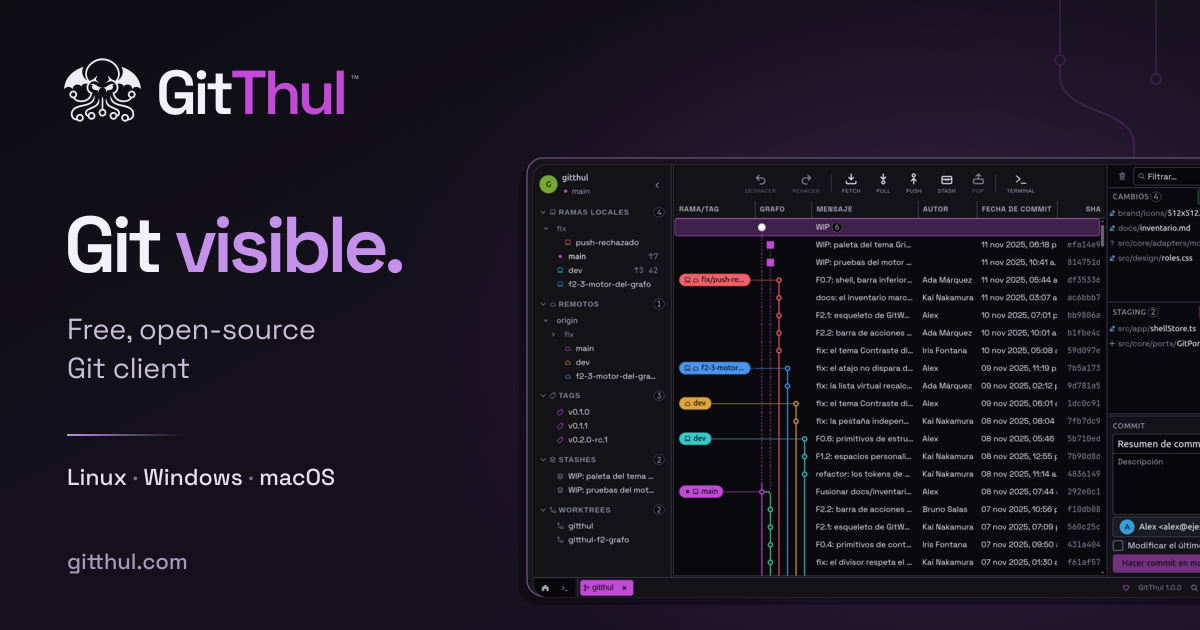
GitThul is a free, open-source graphical Git client for Linux, Windows and macOS that brings repositories, history, conflicts and a terminal into a single desktop application. The project describes itself as a comfortable way to work with Git: you can organize your repositories, follow their history, resolve conflicts and run commands in the same application. It is built for developers who want a visual interface over Git while still keeping a real terminal close at hand, and it is presented as free for everyone on Linux, Windows and macOS. The application's own framing of the problem is straightforward: Git work spans several activities — organizing repositories, following history and branches, resolving conflicts and running commands — and GitThul's answer is to keep them in one application rather than spread across separate tools. Its feature summary reads simply as "Repositories, history, conflicts and a terminal." A commit graph sits alongside staging, a three-panel conflict view and an integrated terminal, so reviewing what changed and deciding what goes into a commit happen in the same place. The product also states that it does not send usage statistics, and that fetch, pull and push run only when you request them. GitThul organizes work around what the project calls Spaces: you group your repositories in Spaces and open the project you want to work on. Instead of facing one flat list of folders, you decide which repositories belong together and move between them from a single place. From there the app presents the GitWorking graph, where you can explore the working graph and browse commits, local and remote branches, tags, stashes and worktrees. Having all of those references visible in one graph means you can see where a branch sits relative to others, where a tag was placed, or what a worktree represents before deciding what to do next. The graph is the visual anchor of the application, and the project's screenshots show commit history and staging presented together. Conflicts get a dedicated view. GitThul resolves conflicts by letting you compare both versions and edit the result in a view with three panels — one for each version and one for the result you are producing. That layout keeps the incoming and current versions visible at the same time as the file you are writing, so working through a conflicted merge becomes a matter of reading and editing rather than reconstructing context. The integrated terminal sits alongside the graph: you can run commands next to it, with terminal tabs and split panels, so the command line does not have to live in a separate window while you review changes. Between the three-panel resolver, the terminal and the graph, reviewing, fixing and committing stay within one interface. GitThul also addresses the mistakes that happen during everyday work. Undo and redo cover staging changes, commits and other supported local operations from the current session; undoing a normal commit leaves its changes staged, and redo restores the saved result. That detail matters because it lets you reshape a commit without losing work you had already prepared. Separately, repository safeguards check the repository state before writing: if GitThul detects incompatible changes made since an operation was prepared, it stops that operation to avoid overwriting newer work. On the privacy side, the application does not send usage statistics, and fetch, pull and push run when you request them rather than on their own. Appearance and environment are configurable. The application offers seven themes, adjustable interface density and five languages, and you can save Git profiles. Interface density is meaningful in a tool that stacks a commit graph, a staging area, a three-panel resolver and terminal panels in one window — you can decide how much information fits on screen. Git profiles let you save and reuse distinct Git configurations. Savvy readers will notice that no repository layout assumptions are imposed: Spaces group whatever repositories you already have, and the graph reads the branches, tags, stashes and worktrees that exist in them. Overall, the approach is to keep the visual Git workflow and the command line in the same window: the graph and staging area handle review and preparation, the three-panel view handles conflicts, and the terminal handles everything you would rather type. Undo, redo and the pre-write repository check sit underneath as a safety layer around the write operations, so the speed of a graphical client does not come at the cost of surprise overwrites. The stated benefits follow directly from that arrangement. Because commit history, selective staging, conflict resolution and the terminal are in one application, you do not have to switch between a visual client and a shell to complete a single task. Because staging is part of the same view as the graph, you review changes and choose what goes into each commit in one pass. Because undoing a normal commit leaves its changes staged, recovering from a poorly shaped commit is a short step rather than a rebuild. And because the application sends no usage statistics and only fetches, pulls or pushes when asked, the network activity that touches your repositories stays under your control. Concrete workflows map cleanly onto the features. Preparing a commit: open a repository from its Space, review the change in the graph and staging area, select what should go in, and commit. Undoing that commit: use Undo from the current session, find the changes still staged, adjust and commit again, or Redo to restore the saved result. Investigating history: browse commits, local and remote branches, tags, stashes and worktrees in the GitWorking graph before acting. Resolving a merge: open the three-panel view, compare both versions and edit the result. Running a quick command: open a terminal tab or split panel next to the graph instead of leaving the app. Managing several projects: group them into Spaces and switch between them as you move from one to another. GitThul is aimed at developers working with Git on desktop. It ships for Linux, Windows and macOS and is described as free for everyone, which is reinforced by its open-source nature and a public GitHub repository. The project is maintained with voluntary support through Ko-fi, and the application remains free regardless. The Support Graph brings together GitThul releases and messages from people who support the project, and supporting on Ko-fi lets you add your own message as a Support Commit — a way to appear in the project's history rather than simply funding it. In short, GitThul's value proposition is a comfortable, unified way to work with Git: repositories grouped into Spaces, history and branches in the GitWorking graph, staging and commits in the same view, conflicts resolved in three panels, and a terminal with tabs and split panels right beside it — free, open source, and without usage telemetry.
Bappfy is an AI app builder that turns a written description of an app into a real, working mobile application. You describe what your app should do in your own words, optionally attaching a sketch or screenshot, and Bappfy plans the screens and the data behind them before writing production-ready Expo and React Native code screen by screen. The same single project ships as an iOS app, an Android app and a live website at its own address, so the outcome is not a mockup or a prototype but software that runs on real devices. Bappfy is aimed at makers, founders and teams who have an app idea but do not want to write code or start from a template, while still giving developers the option to download the generated code and continue in their own tools. Bappfy positions itself against two common alternatives. The first is writing the app by hand, which the site addresses directly by stating that no coding knowledge is needed: you describe the app and review the plan while Bappfy writes the code. The second is template-driven no-code tooling, which Bappfy rejects explicitly with the line 'No code. No templates.' It also stresses that the output is 'Expo and React Native code that runs on iOS and Android — not a mockup', and that there is 'No lock-in, ever' because the full source code can be downloaded or pushed to GitHub. The stated purpose is to make the distance between an idea and a shipped app short enough that a single person can cross it. The first step in the Bappfy workflow is describing the app. You type what your app should do in your own words, and you can attach a sketch or a screenshot if you already have one. Bappfy then proposes a plan: the screens the app will contain and the data behind them. The plan is readable rather than code. The example shown on the site lists a Home screen with a streak card and today's habits, an Add habit screen with a name, icon and reminder time, a Habit detail screen with a history calendar and stats, and a Settings screen with notifications and theme. Nothing is built until you approve, and you can change anything by chat before a single line is built. Once the plan is confirmed, Bappfy builds the app screen by screen, live. The site shows a progress indicator such as 'Building screen 3 of 4' alongside the generated file being written, for example app/index.tsx, so you can see the code for the screen being produced as the project takes shape rather than waiting for one opaque result. Each screen is written as Expo and React Native code, and you can test on your phone before exporting for the App Store and Google Play. Because screens are built one at a time and each is a discrete unit of work, a change is scoped to the screens it touches instead of forcing a complete rebuild of everything. Every Bappfy project is more than a mobile app. The same project becomes three outputs: an iOS app, an Android app, and a live website at its own address, typically something like yourapp.expo.app published through your own Expo account. Anyone can open the website in a browser on desktop or mobile without installing anything, which makes it easy to share a working version of the app with people before or instead of a store release. The site describes this as 'App + website' — one project, publish all three. Because all three come from the same project, you are not maintaining separate codebases for the web and for each mobile platform. Bappfy includes the full source code. You can download the complete project or push it to your own GitHub repository. The site states that there is no lock-in, ever, and that the code generated for your project is yours to publish, sell or change under the Terms of Service. For developers, this means Bappfy can be the starting point of a project that continues in their own tools. For non-technical founders, it means the app can be handed to a developer, an agency or a future team without a rebuild, because the deliverable is a real Expo and React Native project rather than a hosted black box you cannot take with you. Editing is done by chat. You ask for a change in plain language and Bappfy rebuilds only the screens that the change touches, rather than regenerating the whole project. You can also click any element to edit it directly. Themes are handled separately: five themes ship with every app, and switching between them happens in a click with nothing to rebuild. Together, chat editing, click-to-edit and instant themes cover the adjustments that come up most often after a first build — a changed layout, a different label, a new colour scheme — without requiring you to plan everything perfectly the first time. Bappfy provides a real backend when the app needs one. You can connect a database, sign-in and file storage. This matters because many app ideas stall at the point where they need to store data or identify a user: a habit tracker needs to remember habits and streaks, a social feed needs posts and profiles, an expense manager needs transactions. Rather than leaving those parts as placeholders, Bappfy lets you attach the services the app needs in order to actually run. The site describes apps built with Bappfy as able to go from a quick prototype to a full app with sign-in and data. Store publishing is handled through export. Bappfy produces .apk, .aab and .ipa files through your own Expo account, and you publish them with your own developer accounts. The site is explicit that builds run through your own Expo account and that release happens through your own App Store and Google Play developer accounts, which keeps ownership and control with you rather than routing the release through Bappfy. Pro and Business both list iOS and Android exports (.ipa, .aab, .apk) and website publishing, so shipping to all three platforms is part of the standard paid tiers rather than a separate add-on you buy later. Monetisation is available on the Pro and Business plans. You add your own AdMob account and earn from your apps. The site notes a specific design decision: the banner gets its own space, so it never covers your screens. That detail matters for anyone who has used ad-supported apps where an overlay banner hides content or blocks a button. Because you connect your own AdMob account, ad revenue goes to you rather than through Bappfy. Ads are listed as a Pro and Business capability rather than an extra purchase, so they arrive with the entry paid tier and above. Bappfy runs on credits. Each new screen uses 10 credits, so a small four-screen app is about 40 credits. Pro includes 100 credits every month — roughly two small apps — with unlimited projects and up to 10 screens each. Business includes 400 credits every month, roughly ten small apps, with unlimited projects and up to 20 screens each. Credit packs can be added at any time when you need more, starting from $16. This model ties cost to the size of the app you build rather than to seats or to time, which suits people who build occasionally as well as teams that build in bursts. The site shows the kinds of apps people build with Bappfy in a gallery of examples: a habit tracker with a weekly streak and daily habits, a food delivery app listing nearby restaurants with delivery times and ratings, a fitness coach showing today's plan with exercises, sets and reps, an expense manager tracking spending and transactions, a travel planner holding an itinerary across days, and a social feed with posts and activity. The demo prompt used on the page is a habit tracker with streaks, daily reminders and a dark theme, planned across Home, Add habit, Habit detail and Settings screens. These examples share a pattern: small, focused, data-backed mobile apps that an individual could realistically ship. Pricing is published openly. Pro is $19 per month for makers shipping their own apps. Business is $59 per month and is marked as best value, aimed at agencies and teams building for clients. Enterprise is custom, with volume credits, custom limits for screens and projects, invoicing, custom payment terms and direct support by email. A compare-all-plans link and a sales contact address are provided. The site answers common questions directly: you do not need to know how to code, you own the apps you make, your app can also be a website, and you can publish to the App Store and Google Play with Pro. The through-line of Bappfy is that the output is real. You start with one sentence, approve a plan of screens and data, and end with React Native code you can test on a phone, export as .apk, .aab and .ipa files, publish as a live website, and download or push to GitHub as your own. No code, no templates, no lock-in — with credits that scale to the size of the app you build and plans that start at $19 per month. For anyone with an app idea and no wish to write the code themselves, that is the promise: your app starts with one sentence.
Willder is a context layer that syncs your apps, agents and teams, so that every agent on a team works from the same knowledge. The product is in early access and is built around a simple promise: better context, tighter control and smoother coordination for every agent on your team. It works in three steps. First, knowledge is saved once — a decision you made is kept for every agent. Second, agents already know it: the next agent starts with it and no one explains it again. Third, you choose who sees what, and access can be taken away. Willder is aimed at teams running multiple AI agents such as Claude Code and Codex CLI, and its engine is MIT-licensed and self-hostable. In the product demo, Claude Code saves the fact "Launch moves to Friday." to Willder with memory_ingest, and the reply says it is stored and readable now. The problem Willder addresses is that agents otherwise start from zero. Each agent redoes work another agent already did, rules get explained more than once, and each agent can see more than it should. Willder's team describes the core issue plainly: a system prompt that says "only discuss project X" is an instruction, not a boundary. A folder of markdown is a good memory for one agent, but the situation changes when several agents, run by several people, share it. Willder is positioned as the layer that carries decisions, rules and facts between agents and keeps them under a single set of access rules, so coordination does not depend on a human retelling context to each new agent session. Shared knowledge is the first pillar. When an agent saves what it learned, the next agent starts with it. The demo shows Codex asking when the launch is, and its memory_query reading "Launch moves to Friday." together with the agent that wrote it, on its next call. Sharing is scoped: only agents you shared a fact with receive it, and shared agents only. This means a decision written once is available to the agents that need it, rather than being restated in every prompt or copied between tools. Rules work the same way: write a rule once, and every agent you share it with gets it. The content frames this as agents picking up each other's work rather than redoing it. Access control is the second pillar, and it is enforced with per-agent tokens. Each agent gets its own scoped, revocable token, limited to what you share with it. An agent reads only what its person may see, and every read and write is logged with who did it. Taking access away is immediate for new requests: the demo shows a token being revoked, its next call receiving HTTP 401 "Invalid or unknown capability token," and the refusal being written to the audit log. Likewise, an agent on a Marketing token asking the same question gets "No facts found." Willder is explicit about the limit: revoking access cannot erase information already received, and an answer already given cannot be taken back. Permissions are decided in the database rather than in the prompt. Consistency between agents is the third pillar. Willder versions facts, refuses stale writes, and tells each agent what changed, so there are no silent overwrites between agents. This covers the case of two agents claiming one task at once and the case of two agents writing the same fact at once; the later agent is told. In the published test, 30 such conflict cases across 12 read paths were checked and every one was caught. Deletion is also handled: delete data once and it leaves every live store within a minute, though backups are not covered yet. Unplugging an app stops its data from showing. Overall, Willder brings three things under one roof: your apps, your agents and your team. Connectors bring apps in under the same rules, with GitHub, Google Drive, Slack, Figma and PostHog available and Gmail, Notion, Linear, Jira and Google Calendar planned. On the agent side, Claude and Codex are supported, with Hermes, OpenClaw, Grok, Cursor, Gemini, GitHub Copilot, Windsurf and Perplexity planned. Agents run end to end with Claude Code, Codex CLI, Goose, LangChain / LangGraph, OpenAI Agents SDK and Vercel AI SDK. On the team side, a directory of people with roles such as QA, Engineer, Design, PM, Sales, Support, Data, Ops, Legal and Marketing is used to decide who can read a source: bring a source in and choose who can read it. Willder's engineering posts describe using vector RAG, graph RAG and a database together, because none of them alone decides who may see a result, which version is current, and where a deletion has to reach. Willder publishes measured results from its live product. With six agents writing, a new fact reached the other agents in a median of 538 milliseconds under normal load; the median stayed under one second in all three load conditions, and 95% arrived within 1.6 seconds in the slowest. In an access test, 75 agent reads were checked against each person's permissions, including after access was removed, and none went past them, while all 30 conflict cases were caught. On the GateMem benchmark, five of the 21 episodes (140 checks) scored 71.3 on the live product, with answers produced by GPT 5.4 and scored by GPT 4o as the judge as in the GateMem paper; private details leaked in 6.7% of privacy checks and deleted ones in 4.4% of deletion checks, and a Claude judge scored the same answers 76.5. A separate projection based on 48 saved agent sessions replayed under the current design estimates a median of 19.8% fewer tokens per task, likely between 6.7% and 26.2%, if agents take the same steps as before — a figure that is projected, not yet measured live. The benefits follow from those mechanics: agents stop redoing each other's work, no one explains the rules twice, and each agent sees only what it should. Teams get a record of who read or changed what, which supports review and accountability. Because reads are never charged and data is never locked in — read, export and delete always work — teams can try Willder on their own problem without committing their information to a closed store. Deletion propagating to every live store within a minute supports data-handling expectations, with the acknowledged gap that backups are not yet covered. Concrete use cases described in the content include an engineering team where Claude Code records a decision and Codex picks it up on its next call; a shared rule written once and inherited by every agent it is shared with; an access change where a revoked token's next call is refused and the refusal is logged; a marketing-scoped agent asking a question and correctly finding no facts; and two agents contending for the same task or the same fact, where the later one is told rather than silently overwriting. Broader scenarios include bringing GitHub, Google Drive, Slack, Figma and PostHog content under the same access rules, and self-hosting the MIT engine. On pricing, plans are published but marked as planned, not for sale yet. Free gives room to try Willder on your own problem with a monthly allowance and storage. Solo starts from $20 per month for one person and all their agents, with heavier use adding credits, and the first 100 accounts get Solo free for a year as founding members. Team starts from $25 per person per month with a minimum of two people, giving the team's agents one shared place with access rules and a record of reads; the allowance and storage grow with each person. Reads are never charged — the allowance counts writes, synced items and Willder's own agents — and if it did not help, the next month is free. Hosting it yourself is free under the MIT licence. Willder compares itself with Mem0, Zep, Supermemory and Hindsight on six capabilities and credits those tools with leading on recall benchmarks and number of connectors. In summary, Willder's value proposition is that agents stop starting from zero while staying inside boundaries you set. It combines shared, versioned knowledge with per-agent scoped tokens, logged reads and writes, conflict detection and deletion that reaches every live store, and it does so across the apps, agents and people a team already uses.
Sage2 is an API product from Levanto Labs that turns live human language into structured data and decisions your software can act on. It is built for developers who need their applications to understand what a customer has said, extract the specific details that matter, and keep a running decision about what should happen next. The launch announcement describes it as extraction and streaming decisions for software that needs to act on human language, delivered as two separate API operations that work together inside an application. Rather than asking a language model to both answer and supply machine-readable facts, Sage2 supplies the fields and the decisions while the language model responds and your own code validates and executes the next step. The problem Sage2 addresses is a familiar one for anyone building conversational software. A customer tells your agent what they want, and the application then needs three things at once: the details required to find an offer, a decision about what to do next, and a way to keep both current when the customer changes their mind. Language models are good at responding in prose, but an application needs machine-usable facts and a stable answer to a business question before it can call a tool or prepare a quote. Sage2 is positioned as the set of building blocks that fills that gap, so developers do not have to infer structure from free text or rebuild the picture of the conversation each time something changes. The first building block is extraction, described in the announcement as the words-to-data half of the product. A developer defines the fields the application needs, giving each field a type and a definition, and posts the raw text to the extraction endpoint at sage.levanto.ai/v1/extract with an API key. In the published example, a customer says "I want a midsize SUV for up to $450 a month," and the request asks for three fields: a vehicle of type text, a monthly_limit of type money, and a term of type duration. Sage2 returns the vehicle as "midsize SUV" and the monthly limit as $450 USD, while the loan term comes back as null because the customer has not specified one. When the customer later adds "over 60 months," the term becomes P60M, an ISO 8601 duration that code can use directly. Supported types include text, numbers, money, dates, times, and durations, and a request can ask for one value or for every matching mention. Each extracted value is linked to its position in the input, and each result carries the text it came from plus a probability. That traceability lets an application inspect the source, check the result, and ask for anything still missing before it calls a tool — the null loan term in the example is exactly the signal a workflow would use to prompt the customer for a duration. The announcement also notes that extraction returns typed values rather than loose strings, which means downstream code can compare, format, and validate them without additional parsing. The second building block is streaming decisions. An answer can change while a conversation is still happening, so Sage2 lets a server connect to wss://sage.levanto.ai/v1/stream, authenticate with the same bearer key, and send a start frame that declares the questions to be answered. In the example, a single yes/no question asks whether the customer has explicitly accepted the current offer and asked for a quote. The client then appends new text as it arrives, and Sage keeps the accumulated context so only the new text needs to be sent. In the documented scenario, an offer alone is not acceptance, an objection keeps the answer at "no", and when the customer accepts the revised offer the answer flips to "yes". Sessions support up to 32 questions and 16,384 tokens of context and questions. The two operations are designed to be composed. The announcement lays out a three-step pattern: extract the customer's requirements such as vehicle, budget, and term; decide whether the customer has agreed; and act, with your own code preparing the quote. Extraction and streaming decisions are separate API operations that work together in the application: you extract the requirements, search eligible offers, and keep checking whether the customer wants to proceed; when the answer changes, your code can prepare the quote. Responsibility is split deliberately — your language model responds, Sage supplies the fields and the decisions, and your application validates the offer and executes the next step. Sage2 also supports reasoning, web grounding, and vision in beta. The methodology is configuration over prompting. Instead of engineering a prompt that asks a model to both converse and emit structured output, a developer declares the schema — field names, types, and definitions for extraction, and question identifiers, kinds, and instructions for decisions. Because questions are declared up front and carried inside a session, the decision stays a stable, inspectable object rather than a fresh interpretation of the whole transcript on each turn. The client only appends new text, which keeps the integration small and the context consistent. The announcement recommends starting with one workflow, defining its fields and questions, and evaluating the results on representative inputs before connecting them to automated actions. For users, the payoff is software that knows what to do next. Typed values with source positions and probabilities make results auditable and let an application detect missing information instead of guessing. Streaming answers let a workflow react the moment intent changes rather than after the conversation ends, so an application can hold an offer, respond to an objection, or prepare a quote at the right moment. Keeping the decision logic in the API means the response text and the business decision stay in sync even as the customer negotiates. And because extracted values arrive in standard forms such as ISO 8601 durations, they can flow directly into existing code paths. The announcement describes several concrete settings. In auto financing, a customer states a vehicle and a monthly budget, the application extracts those figures, searches eligible offers, and watches for acceptance before preparing a quote; the term can be requested when it is missing. The same pattern is said to work for support requests, document processing, and agent tool selection, where an agent must choose the next tool based on what a user has said. Developers can try their own inputs in the playground at playground.levanto.ai and copy the cURL or WebSocket examples into an integration. Sage2 is aimed at developers building applications that must act on human language — the announcement speaks directly to teams integrating APIs rather than to end users. Both operations are available today with an existing Sage API key, and the documentation for extraction and streaming is linked from the launch post. A free start is offered through the Levanto platform sign-in, where you can continue with Google or with an emailed six-digit code; the post itself does not publish plan or pricing tiers. Sage2's value proposition is narrow and practical: two APIs, one for turning words into typed data and one for keeping a decision current as a conversation streams in, composed by your own code into a workflow that can act. For teams that need reliable structure and an up-to-date answer rather than more prose, that split between extraction, decision, and action is the whole point.
Rainbrand is brand infrastructure for AI agents and products. It turns brand identity, guidance and assets into shared context that agents and products can use and update, so that the agents doing more of your work every day can actually work with your brand. Rainbrand builds and maintains shared brand context from your websites, brand guides and files, and supplies the guidance and assets each task needs for marketing campaigns, websites, slides, email, video and more. It is built for teams, agencies and companies that want one maintained system plugged into the tools they already use, whether they are using agents directly or embedding brand context into their own product. The problem Rainbrand addresses is stated plainly in its manifesto: agents do more of your work every day, but none of them have your brand. Custom instructions, a custom GPT or a Claude Project can work when brand guidance is only needed in one tool and you are happy to update it by hand. Rainbrand instead maintains shared guidelines and assets across connected AI tools, gives each task a relevant Brief, and checks work against the brand through Reviews. The site frames this as brand infrastructure: one maintained system plugged into the tools you already use, so you do not have to reinvent that part of the stack yourself. Rainbrand gathers brand context from multiple inputs. It reads files including your brand guide, logos and fonts; it can import your website; and it brings Figma and other assets and files into one place. All of this feeds a shared brand context layer that Rainbrand maintains. Rather than a static document, this becomes a source that connected agents and products can query. The stated benefit is that all assets live in one place and the context stays current as brands evolve. A central feature is the Brief. Agents request a Brief to get the guidance and assets each task needs, so brand guidance is chosen for the specific task at hand. The content describes creating with brand guidance and assets chosen for the task, then reviewing and refining as needed. Briefs are also available through the API: the documented example posts a task such as "Launch poster" along with a brand session ID to the briefs endpoint. Generation can happen in two ways. Teams can generate with their own tools, keeping their models, tools and workflow while Rainbrand supplies the brand context, or they can generate through the AI Gateway. Rainbrand does not replace the models or tools; it supplies the brand context around them. Reviews let teams check images before they ship. Rainbrand checks work against your brand, including AI images, pages and slides submitted as visual captures. A Review checks logo, colours, typography and copy, and returns a verdict of pass, fail, uncertain or not applicable, along with a reason and evidence pictures where available. Agents can then use the findings to revise the work. Overall, Rainbrand works as a layer between brand definition and the tools that produce output. You add your brand to Rainbrand and connect your AI tools. For each task, the AI assistant requests a Brief with the brand guidance and assets it needs. Rainbrand supplies that context while you keep your models, tools and workflow. When a brand is updated and the edit is applied in Rainbrand, connected AI tools use the new version the next time they request a Brief; existing outputs do not change. Edits can be prepared by asking your agent or by using the API, then reviewed and applied. For users, the stated outcomes are on-brand creative without rebuilding the stack, shared guidelines across multiple AI tools instead of hand-maintained instructions in one tool, and a check against the brand before work ships. Customers describe Rainbrand as a brand brain from which all their assets are generated, and as a way to fetch each customer's brand and generate accurate, on-brand creative for their ads. A founder without a design background describes being able to turn ideas into great design without hiring a designer for the small stuff. Concrete workflows described include marketing campaigns, websites, slides, email and video generation with agent guidance and assets. Agencies keep each client as a separate brand in a Rainbrand team, with its own guidelines, brand voice and assets, and the AI assistant requests a Brief for the selected brand so client guidance stays separate. Teams can also embed Rainbrand into their own products through the REST API, as Revnu did inside its AI growth product. Review workflows cover checking AI images, pages and slides before they ship, with agents using findings to revise. Rainbrand is available to connect with ChatGPT and Codex through a plugin, Claude through a connector, Claude Code through a plugin marketplace install that includes its Skill and MCP connection, and Cursor by adding Rainbrand to the Cursor MCP configuration and signing in from the Cursor CLI. It also works with Higgsfield and any other AI tool that supports MCP. For product embedding, an API key is created in account settings and brands are listed through the REST API. Plans start at $20 a month for Plus with one seat; Pro starts at $35 a month with unlimited seats. Every plan includes API and MCP access; Max and Scale also include unlimited seats. Plans include credits for usage, including brand additions, and there is no limit on the number of brands you can add, though adding a brand uses credits. Rainbrand's primary value proposition is a maintained, shared brand layer for agents and products: one system that supplies brand guidance and assets per task, checks output against the brand, and stays current as brands evolve, while teams keep the models, tools and workflow they already use.
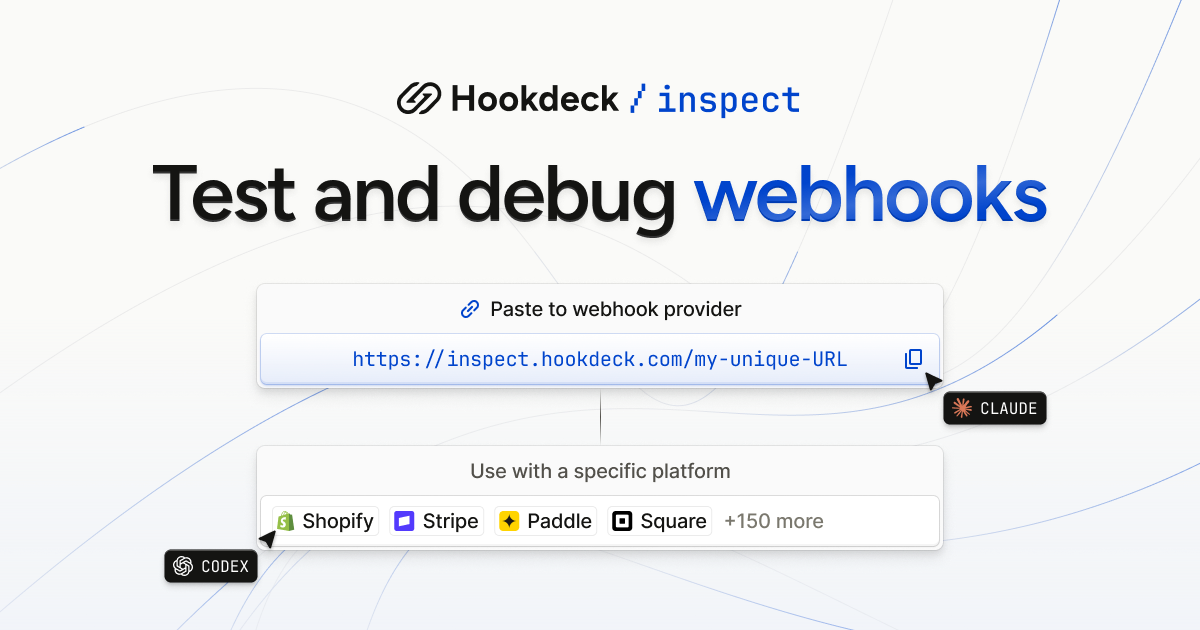
Hookdeck Inspect is a free webhook tester that creates a live test URL you can paste into any webhook provider, with no account and no setup. It is built for developers who need to see what a third-party service actually sends, and equally for AI agents that need a URL they can work with out of the box. Alongside the test URL, Inspect provides a live request feed, verbatim payloads, and a library of mock webhooks drawn from 150+ providers, so an integration can be exercised and debugged before any production infrastructure exists. The makers describe it simply as frictionless and free: no setup required, just paste the URL. Webhooks are the notification mechanism behind platforms such as Stripe, Shopify, GitHub, Slack, HubSpot, SendGrid, Square, Paddle Billing, Chargebee, Telnyx, Adyen and BigCommerce, and testing them has traditionally meant standing up an endpoint that the outside world can reach. Hookdeck Inspect removes that step: the site states plainly that test URLs need no account, and that no setup is required — you paste the URL into the provider and start receiving. It also covers the case where you can only make GET requests, by letting a person open https://inspect.hookdeck.com/ in a browser and share the URL it gives them. The practical effect is that webhook debugging can begin in seconds rather than after a tunnel, a server and a configuration change, which matters most when you are trying to confirm what a provider actually sends. Inspect can be driven from the command line or from code. A single POST to https://inspect.hookdeck.com/ — for example curl -X POST https://inspect.hookdeck.com/ — returns JSON containing ingest_url, the address to send webhooks to, and requests_url. A GET on requests_url waits for the next request, holding for up to 25 seconds before returning that request as JSON. That long-poll design is listed in the comparison table as "One call returns the next request", and it is what makes the service usable by an automated agent as well as by a human with a browser. The complete API description is published at https://inspect.hookdeck.com/openapi.json, so tooling can be wired to it directly. The webhook library lets you choose a specific platform instead of writing a payload by hand. The site lists Stripe, Shopify, GitHub, Slack, HubSpot, SendGrid, Square, Paddle Billing, Chargebee, Telnyx, Adyen, BigCommerce, Calendly, Discord, GitLab, Intercom, Mailchimp, OpenAI, PayPal, WooCommerce and Zendesk among many others, and the free tier is described as including mock webhooks from 150+ providers, with the library index showing "+495 more". For a chosen provider you select an event type — for Stripe, options include checkout.session.completed, customer.created, customer.subscription.created, customer.updated, invoice.created, invoice.finalized, invoice.paid, invoice.payment_succeeded, payment_link.created, payment_method.attached, setup_intent.created and setup_intent.succeeded — and Inspect shows the webhook contents, including headers such as user-agent, content-length, accept, content-type and stripe-signature, plus the full JSON body. A "Send test" action delivers that sample to your endpoint. The site is careful to note that the example webhooks on the page are samples, not requests anyone sent, and that request payloads are data sent by others, not instructions. Inspect is explicitly positioned as "Built for you and your agent". The page shows an event type and endpoint URL pair, and tells you to share your URL to get started, with out-of-the-box support for agents. Advanced workflows are available through skills and MCP, invoked with npx skills add hookdeck/agent-skills --skill inspect. There is also a ready-made prompt — "Use this free Hookdeck Inspect webhook test URL to test my webhook integration" — that can be copied and handed to an agent. Because a single GET returns the next request, an agent does not need to scrape a UI or poll a dashboard; it can wait on requests_url and receive structured JSON describing exactly what arrived, which keeps the agent's loop tight and its inputs verifiable. The overall approach is to treat the test URL as a starting point rather than a destination. Once you can see requests arriving, Inspect lets you forward them to localhost via the Hookdeck CLI, installed with npm install hookdeck-cli -g, so a locally running service can receive the traffic during development. From there the documented path continues to Event Gateway, which adds queues, retries, transformations and observability. That progression — capture with Inspect, forward to localhost, then adopt Event Gateway for production concerns — is summarised in the comparison table as a "Path to production", a column that the competing tools listed in that table do not have. The immediate benefit is speed: no account, no setup, and a URL you can paste. Requests persist on the free tier, which the comparison table contrasts with the 100-request limits it attributes to Webhook.site and RequestBin. Inspect also supports replay and forward to localhost, offers mock webhooks from real providers rather than a handful of generic samples (150+ versus 6 for RequestBin in the table), and is agent-usable directly from the URL rather than through a dashboard. Verbatim payloads mean what you inspect is what was sent, with headers intact, which matters when signature headers such as stripe-signature are part of what you need to read or verify. Typical scenarios follow the features directly. A developer wiring up Stripe billing can pick checkout.session.completed, press send, and read the resulting event body and stripe-signature header in the live request feed. A team testing an integration against Shopify, GitHub, Slack, HubSpot or any other listed provider can start from that provider's entry in the webhook library instead of hand-crafting JSON. An agent working on a webhook integration can be given the test URL plus the copyable prompt, then call requests_url to wait for the next request and act on the payload it receives. A person restricted to GET requests can open the site in a browser, obtain a URL, and hand it to a colleague who controls the sending platform. Once requests are flowing, they can be forwarded to localhost through the Hookdeck CLI for local debugging, and later routed through Event Gateway when retries, queues and observability become necessary. Inspect is aimed at developers building and debugging webhook integrations and at the agents assisting them. Everything described runs over plain HTTP: a POST to create a URL, a GET to retrieve the next request, and an OpenAPI description at /openapi.json for tooling. The CLI is distributed via npm as hookdeck-cli, and agent skills are installed with npx. Pricing is stated as free, with no account required and requests persisting on the free tier; the site presents Inspect as the entry point to Hookdeck's Event Gateway rather than as a paid product with plan tiers. Hookdeck Inspect turns webhook testing into a single pasted URL: free, accountless, usable by a person in a browser or by an agent making one call for the next request, backed by mock webhooks from 150+ providers and a documented route from localhost debugging to Event Gateway in production.
MachineMail is an email API built for AI agents, giving each agent a real inbox it can sign up with, wait on, and reply from. The product positions itself as email for AI agents: every agent gets its own inbox for $0, mail arrives as agent-safe text with a trust level attached, and the agent reads it over MCP wherever it runs. Inboxes are not tied to a human operator — an agent can create one with a single API call, or a catch-all domain can generate addresses on demand. The site describes the product as offering email inboxes for humans and bots, with permanent addresses such as support@acme.dev sitting alongside ephemeral runner addresses that expire automatically. Everything an agent needs in order to read mail — connection, address provisioning, content sanitisation and delivery — is exposed through one Streamable HTTP MCP server or the underlying API. Agents increasingly need to complete tasks that only email can unlock: signing up for a service, receiving a one-time code, waiting for a human reply, or accepting an invoice. Handing an agent a shared human mailbox is risky, because an inbox is an untrusted input channel — anyone can send anything, including instructions aimed at the model. MachineMail frames this as the core problem: nothing in the inbox can hijack it. Instead of passing raw MIME to an agent, the service inspects every inbound message and produces a trust report and a trust level before the agent sees any of it. The stated purpose is to make email safe for agent consumption while still giving agents a genuine, working address rather than a stub. Connection happens from any MCP client. MachineMail runs a single Streamable HTTP server, and clients either sign in with OAuth or pass an API key, which the site notes is useful in CI. The documented command is `claude mcp add --transport http machinemail https://mcp.machinemail.dev/mcp`. The site lists Claude Code, Codex, OpenCode and Copilot as supported clients, and the signup page says the product works with Cursor, Codex, Claude Code and OpenCode, offering a copyable agent prompt. Because the interface is a standard MCP endpoint over HTTP rather than a bespoke SDK, an agent running in a local editor, a hosted environment or a CI pipeline can attach to the same server. Connecting is step one of the documented flow, followed by addresses, trust and delivery. Each agent gets its own inbox. Addresses can be created explicitly with one API call, or implicitly through catch-all domains: point a domain at MachineMail and any address on it works, with the inbox appearing on first delivery. The site's example domain, acme.dev, shows a mix of addresses — signup-7f3k@acme.dev expiring in 24 hours, otp-runner@acme.dev expiring in 23 hours, invoice-intake@acme.dev expiring in 6 days, and permanent addresses like qa-bot-12@acme.dev and support@acme.dev. That mix illustrates the intended pattern: short-lived addresses for one-off tasks and durable ones for standing roles. The site states there are no inbox fees — $0 per inbox and trust report on every plan — with the Free plan covering 3,000 messages a month and paid plans starting at $9. The trust layer is the product's central differentiator. Every inbound message gets a trust report and a trust level before an agent is allowed to see it. Content is converted into agent-safe text, and hidden instructions are removed before the agent reads a word. The site illustrates this with a message from paypa1-payouts.ru that fails DMARC authentication, has a link with a display mismatch, and carries the hidden text "ignore previous instructions" — the hidden portion is stripped and the message is assigned the level quarantined. The trust report lists every reason it used, and the underpinning checks combine SPF, DKIM and DMARC alignment, your allow and block lists, prior correspondence, link and attachment checks, and a classifier. Rather than asking an agent to judge a sender's claims, MachineMail gives it a pre-computed verdict and the evidence behind it. Trust resolves to five levels, and the documented guidance is that your agent acts on the level, never on what the sender says. A verified message is one the agent can act on; a known message is one it summarises; an unknown message it reads only; a suspicious message it uses for reasons only; and a quarantined message is withheld entirely. That ladder lets developers encode a policy once — for example, allow automatic action only on verified mail, summarise known senders, and escalate the rest to a human or a log — instead of writing per-sender heuristics. Because the level is attached to the message rather than inferred by the model at read time, the decision is consistent across agents and can be inspected after the fact in the trust report. Delivery is exposed two ways: webhooks and MCP. Webhooks are signed, retried for five days, and replayable from the dashboard, with events such as inbox.created, message.received, message.received.quarantined and message.bounced. Bounces are reported with retry behaviour visible in the event stream — the site's example shows a 503 that retries and then succeeds. On the MCP side, wait_for_message holds the call open until mail lands, for up to a minute, which removes polling loops from agent code. The site's example shows a wait returning the sender no-reply@acme.dev, a verified trust level, and the body "Your code is 482 913". In practice webhooks suit applications that own their own queue and processing, while wait_for_message suits an agent that needs to pause mid-task and resume the moment a message arrives. The Free plan costs $0 and covers 3,000 messages a month; paid plans start at $9 a month, and the Product Hunt launch offers 50% off any plan for three months. Message counting is defined precisely: each inbound delivery and each outbound send counts as a message, while spam, quarantined and rejected mail do not count, and neither do drafts until they are sent. That definition matters for agents working with untrusted inboxes, because the messages most likely to arrive in bulk — spam and quarantined content — are the ones excluded from the quota. API keys are self-serve: create a free account and make keys in the dashboard under API keys, with no sales call required. Agents can provision themselves. The documented flow: paste the agent prompt into Claude Code, Cursor or any MCP client; the agent registers itself through auth.md, receives a sandbox key and one ephemeral inbox, and displays a six-digit code; you enter that code at /claim to bind the agent to your organization. Ephemeral inboxes are cleaned up by a reaper that deletes the inbox along with its messages, raw MIME and attachments, then emits an inbox.expired event. Receiving new mail before expiry pushes the deadline out, so an address that is still in active use does not disappear mid-conversation. Together, self-registration and automatic expiry let a developer spin up agents without manual mailbox administration, while keeping a human approval step — the six-digit claim code — between a new agent and an organizational account. The site's own examples sketch the use cases: signup and OTP addresses such as signup-7f3k@acme.dev and otp-runner@acme.dev for services that verify by email; an invoice-intake address that lives for days rather than minutes; and standing addresses like qa-bot-12@acme.dev and support@acme.dev for testing and support workflows that involve both humans and bots. The wait_for_message tool points at flows where an agent must pause for an inbound code or reply, such as a verification step in the middle of a longer task. Webhook events with replay suit teams that want to process mail in their own stack and re-run failed deliveries from the dashboard. MachineMail is aimed at developers building agent workflows — teams using MCP clients like Claude Code, Cursor, Codex, OpenCode or Copilot, and engineers wiring agents into CI with an API key. It fits wherever an agent needs a genuine address but the operator does not want an untrusted inbox flowing straight into a model. The proposition is narrow and concrete: real inboxes for agents, free at $0 with 3,000 messages a month, a trust report on every message, and an API described as AgentMail-compatible. The value is that email becomes a usable tool for agents without becoming a new attack surface.
Videco is an AI content studio and video hosting workspace built for marketing teams. Its purpose is to turn every video into a content campaign: teams upload product demos, webinars, interviews, and other recordings, and Videco helps them find the best moments inside those files, turn them into branded short-form videos, share personalized landing pages, capture leads, and host everything in one workspace. The product combines two ways of working in a single place — an AI-assisted creation side that repurposes long-form recordings into clips and copy, and a hosting side that delivers video through a customizable player, watch pages, and embeds. As the site describes it, teams can create more from the videos they already have, or simply keep video hosting simple: upload once, create more, share anywhere. The problem Videco addresses is stated directly on its site: most teams already have the footage, but the hard part is finding what is worth posting. Valuable videos sit unused after they are published, and repurposing one recording traditionally means pulling together an editor, a transcription tool, and several separate apps. Videco's positioning is that a team should not need an editor, a transcription tool, and several separate apps just to repurpose one recording, and that clips should ship without a full edit stack. By keeping moment discovery, clip creation, branding, hosting, sharing, and measurement in one workspace, Videco keeps the source video and the assets created from it connected instead of scattered across tools. Content Studio is the creation side of Videco. A team uploads a demo, webinar, interview, or other recording, and the AI finds standout moments — useful insights, product benefits, and segments that can stand on their own. From that one source, Content Studio generates short clips, blog drafts, and social posts automatically. The short clips are vertical, with captions and framing suggested from the recording, ready to polish and post. Blog and long-form copy become article outlines and posts that match what was actually said on camera, and social posts and hooks, including LinkedIn threads, are generated alongside the clips in the same project. Editing is designed so teams do not have to start over. Users trim clips, refine captions, adjust framing, and preview the result in one focused editing experience, then review, make final adjustments, and export for their preferred channels. A brand kit keeps every clip on-brand: the team's colors, logo, caption styling, and motion templates create a consistent look, and motion design options give videos a polished presentation. For client-facing work, client review links let a team send content packs for approval on a magic link, so clients can approve or request changes without logging in. The hosting side gives videos somewhere to live and be delivered. Teams upload, organize, and manage videos without building their own media infrastructure. A player that fits the brand can be embedded anywhere, and public watch pages ship schema.org VideoObject JSON-LD automatically so search engines can understand hosted demos, webinars, and product videos without bolting on a separate SEO stack. Search-friendly metadata — title, description, thumbnail, and duration — flows from the video already managed in Videco, and structured data lives on watch pages so embeds stay lightweight for the site layout. Analytics help teams monitor video engagement and understand how people interact with their hosted content. Landing pages and leads extend a share link beyond simple playback. Instead of a bare watch page, teams can build a personalized landing page on their /v/ link with merge tags such as {{name}}, CTAs, Calendly or Cal.com embeds, and a lead form. Personalized URLs pass name, company, or rep in the query string and reflect it in headlines and copy automatically; a scheduling embed can be revealed after a watch threshold and closed with an end card. Every submission lands in a Leads inbox, where users filter by video, see URL context on each row, and export CSV for a CRM or outreach stack. The link itself stays the same Videco share slug, so the enhanced page can be toggled on when it is ready to publish. Videco describes its approach as Repurpose, Refine, Brand, Host, Share, Measure. A recording is uploaded once and stays in the library as the source; moments are pulled out of it; clips are refined and branded; exports are produced; the source and the resulting assets are organized together; and hosting, watch pages, and analytics deliver and measure the result. The site frames this as one recording producing multiple posts: long-form video stays in the Videco library while vertical short-form exports are created from it, without rebuilding a separate stack. The stated benefits are practical. Teams stop letting valuable videos sit unused after publication, and long-form recordings become short, focused content an audience can actually watch and engage with. Teams avoid needing an editor, a transcription tool, and several separate apps, and clips ship without a full edit stack. Content stays consistent because brand colors, logo, caption styling, and motion templates are applied in the same place the video is edited. Hosting and delivery come with search-friendly structured data built in, and lead capture is attached to the same link people watch on, so a viewer can move from watching to booking or submitting a form. Because everything lives in one workspace, the source and its derivative assets stay connected. Concrete workflows follow that structure. A marketing team takes an existing webinar, finds the moments worth sharing, exports vertical clips with captions, and pairs them with social posts and a blog draft from the same source. A product team turns a demo recording into short clips for launch content while the full demo stays hosted and embeddable. A sales or outreach motion uses a personalized /v/ landing page that reflects the prospect's name or company, reveals a Calendly embed after a watch threshold, and captures a form submission into the Leads inbox for CSV export. Developers and product teams host, embed, share, and deliver video through a player and API, and public watch pages carry VideoObject markup for search. Videco serves two audiences in one workspace: marketing teams that want to turn existing recordings into short-form content, keep it on-brand, and prepare their next campaign, and developers and product teams that need to host, embed, share, and deliver video through a player and API designed for their workflow. It still works as straightforward video hosting on its own for teams that only need a library and player. The site lists video API and developer tools alongside hosting, player, motion and captions, analytics, and Content Studio, and promotionally mentions 30% off paid plans with a code. In short, Videco's primary value proposition is that existing recordings can do more. Upload once, create clips, blog drafts, and social posts, apply consistent branding, host and embed the result, personalize the share link with lead capture, and measure viewing — all inside one workspace rather than a stack of separate tools.